Fireflies Billing FAQs: Charges, Invoices, Refunds, and Plan Changes
Last updated: September 15, 2026
Billing questions can come up at any time. This guide helps you understand Fireflies’ billing, including trials, seats, invoices, refunds, and plan changes, so you can manage your subscription with confidence.
This guide is part of the broader Manage Fireflies account subscriptions, billing, and refunds documentation.
Let's get started 🚀
💳 Billing & Additional Charges
This section covers the most common questions about charges you may see on your Fireflies account and why they happen.
1. Why was I charged after my free trial?
If you don’t cancel your subscription before your trial ends, Fireflies automatically upgrades you to a paid plan, ensuring no interruption to your access.
To avoid being charged:
Cancel your trial before the trial end date.
Related: How to cancel the Fireflies free trial
If you were charged after your trial ended:
Contact Fireflies Support to request a refund.
Refunds may be full or prorated (Adjusted), depending on the refund policy.
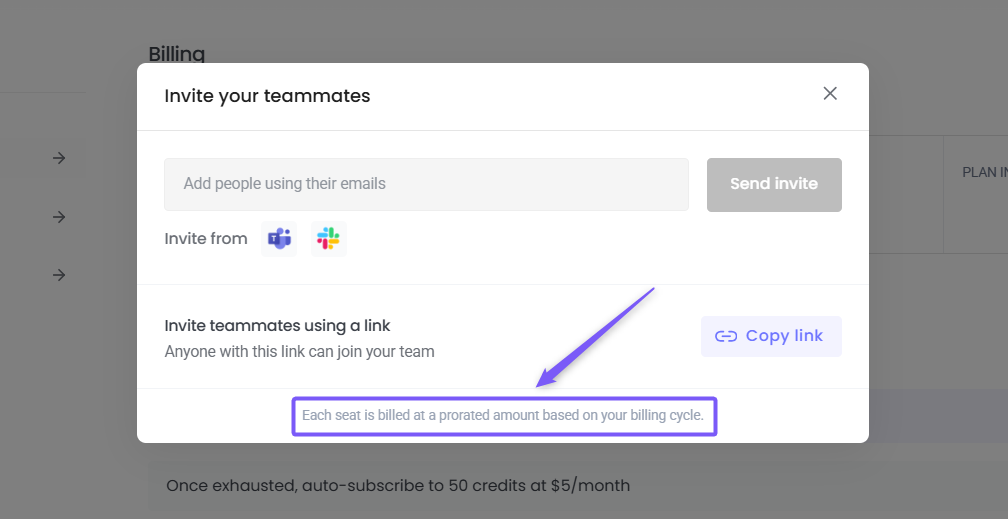
2. Why was I charged for inviting teammates?
Fireflies uses seat-based billing, which means each teammate you add to your workspace is counted as a paid seat.
If you see charges related to teammates, here’s what to do:
Review your active workspace members
Remove teammates you no longer need
Reach out to Support if you believe the charge was accidental or recent
Fireflies clearly shows seat-related charges when inviting teammates, so it’s worth double-checking before adding users.
3. What does a “seat” mean?
A seat represents one user in your workspace. Every active user—admin or member—counts as a billable seat.
Related: Learn about the Fireflies Team feature
4. Why do I get an additional charge of $5 on top of my Fireflies subscription?
You may see an additional charge if you’ve enabled an add-on, such as AI Credits.
AI Credits provide access to advanced Fireflies features, including: AskFred, AI Skills Magic Soundbites, and Custom summaries.
💡Good to know:
For users on paid plans, AI Credits come with a free trial.
If you do not cancel the AI Credits subscription after the trial period ends, you will be charged an additional fee starting at $5 per month per user.
AI Credits are available on monthly or annual billing. Annual plans are priced 20% lower than monthly.
Your monthly credits limit stays the same on an annual plan — annual billing affects the price and renewal frequency, not the credits you receive each month.
AI Credits are non-refundable.
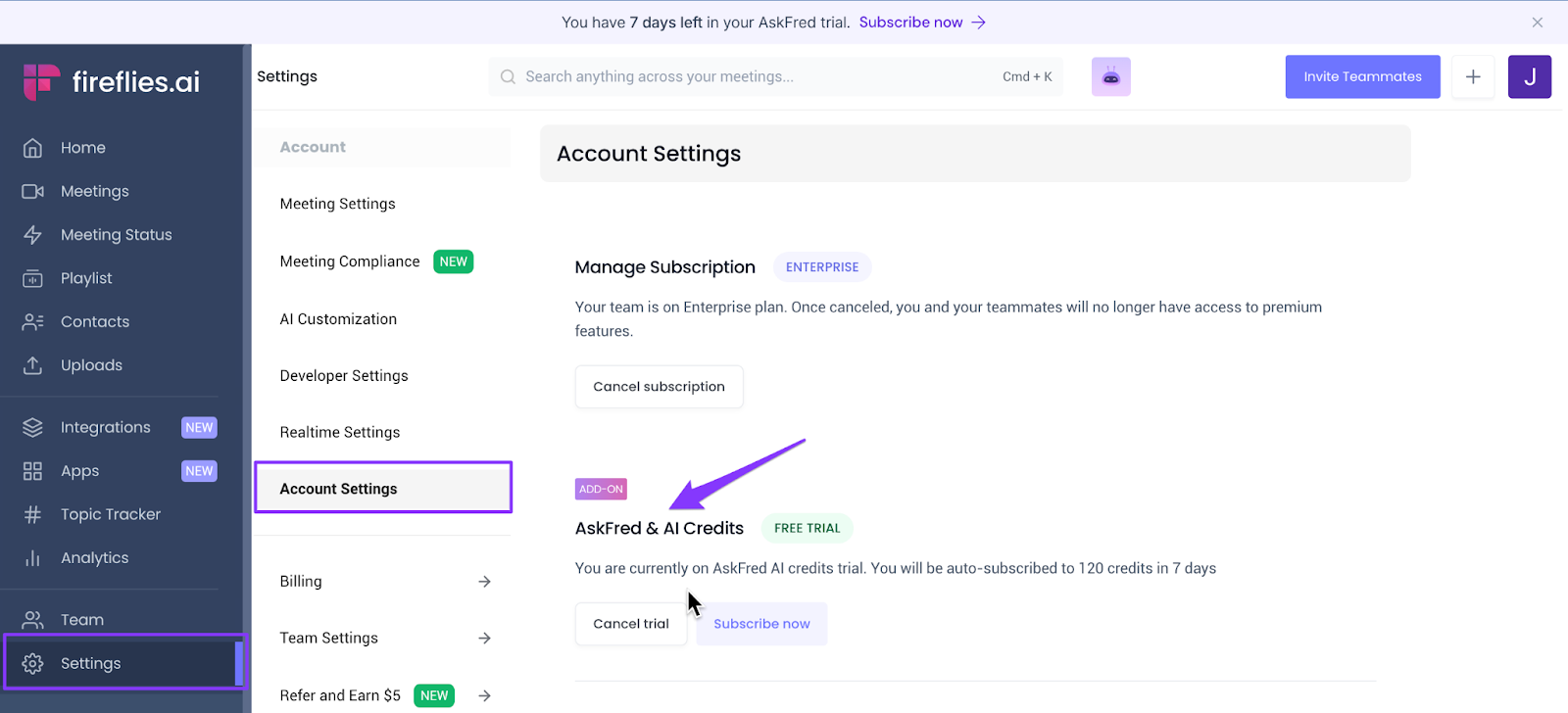
To check whether your AI Credits subscription is active:
Go to Settings → Account Settings
Look for AskFred & AI Credits and confirm the subscription status
Alternatively:
Go to the Billing section
Check whether the AI Credits subscription is listed as active
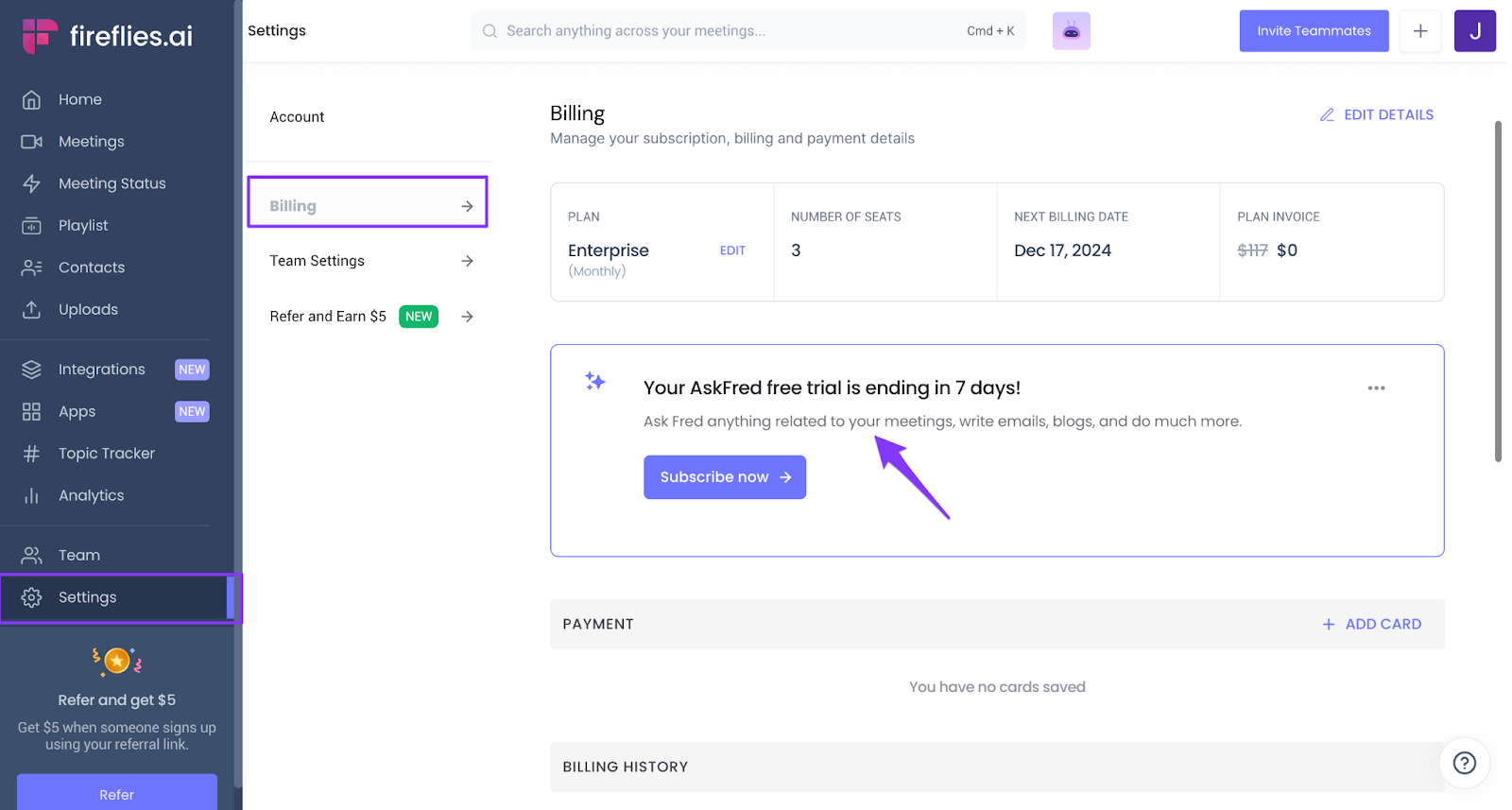
To cancel your subscription, go to Settings and click Cancel.
After canceling, you’ll continue to have access to your AI Credits until the end of the current billing cycle.
Related: How to cancel AI Credits Subscription
5. Can I get a refund for billing charges?
Refunds depend on when the charge occurred, how much the product was used, and Fireflies’ refund policy.
If you believe a charge was incorrect, contact Fireflies Support as soon as possible for review and next steps.
🧾 Invoice and billing
Find answers to common questions about invoices, billing access, and billing details.
1. Where can I find the invoice?
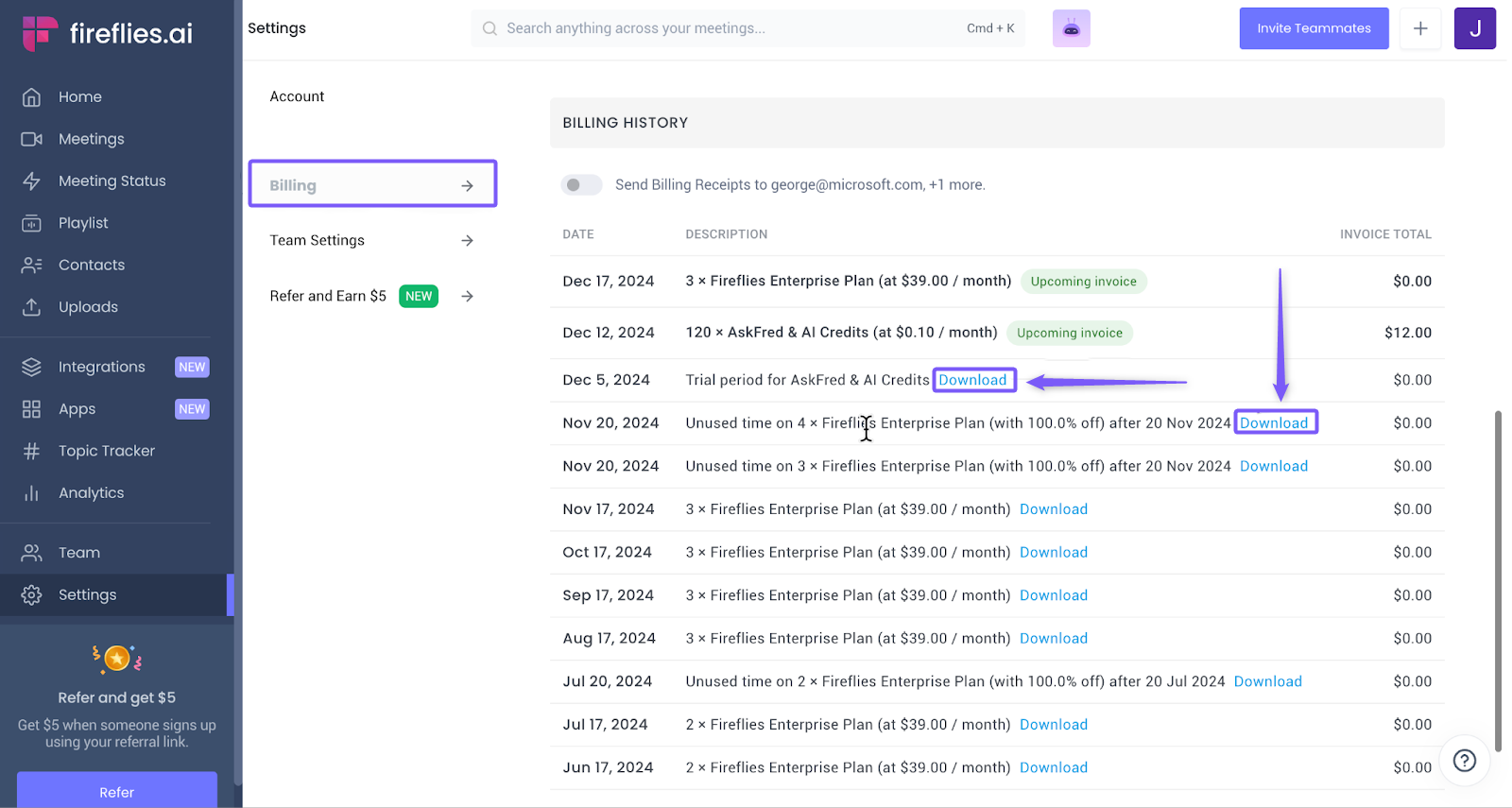
You can find your invoices in the Billing History section. Go to Settings → Billing and scroll to Billing History to view all billing records.
To download an invoice, click Download next to the invoice you want.
Related: How to view invoices and bills
2. Can I edit my billing details?
Yes, you can update your billing information at any time.
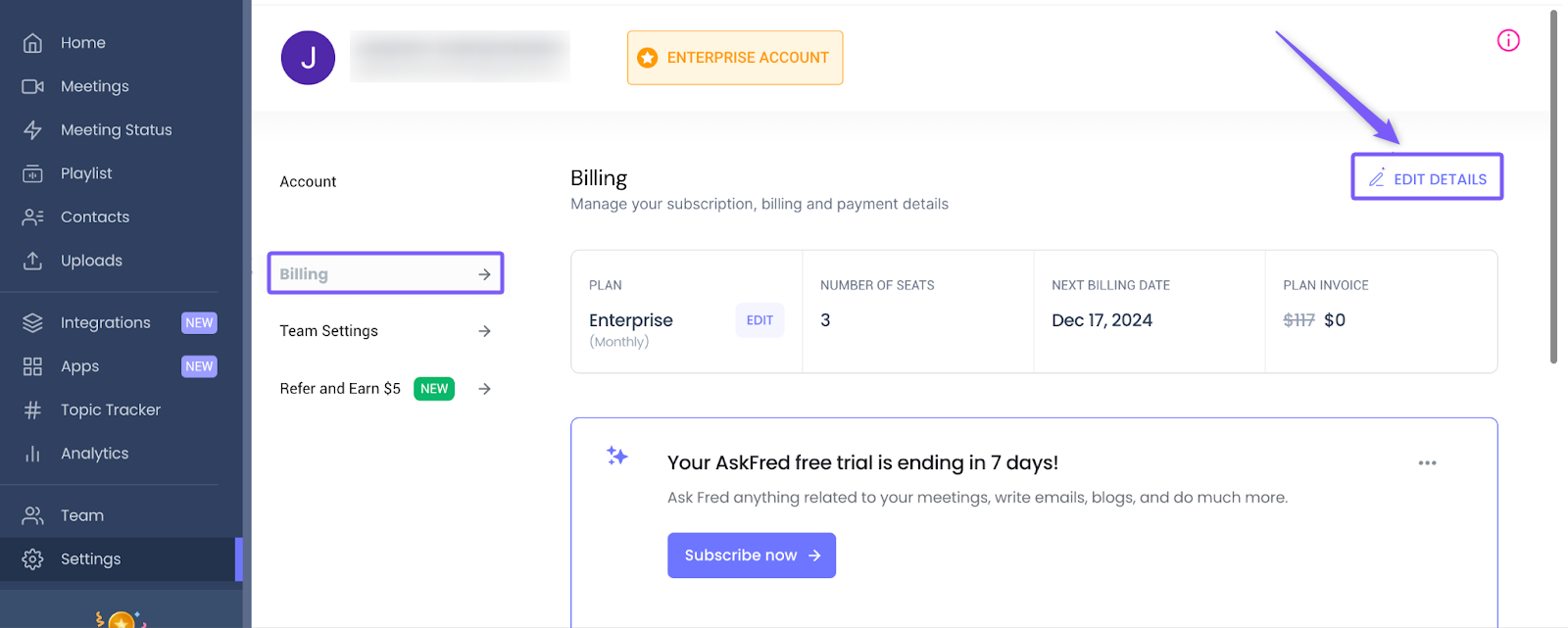
Go to the Billing section and click Edit Details to update your billing address, name, and other details.
Related: How to edit billing details in Fireflies
3. Why can’t I access my billing page?
Only admins can access the billing page. If you are not an admin, you will not have access.
4. Can I send billing invoices to another email address?
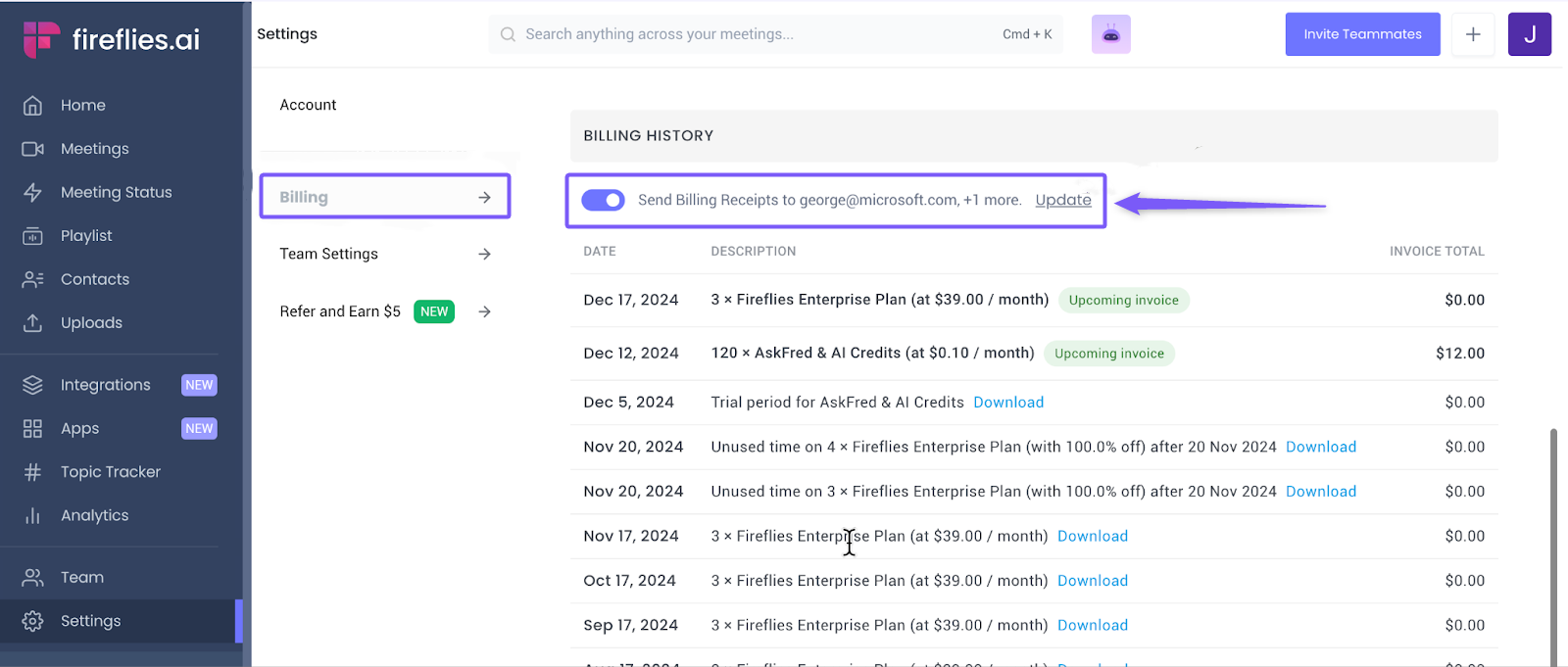
Yes. From Billing, scroll down to Billing History. Then, enable the Send billing receipts toggle and click Update to add the new email address.
Related: How to send a Fireflies invoice to a different email address
🔄 Plan changes and payments
1. Can I downgrade my Fireflies subscription plan after making a purchase?
Yes, you can downgrade your plan after purchasing.
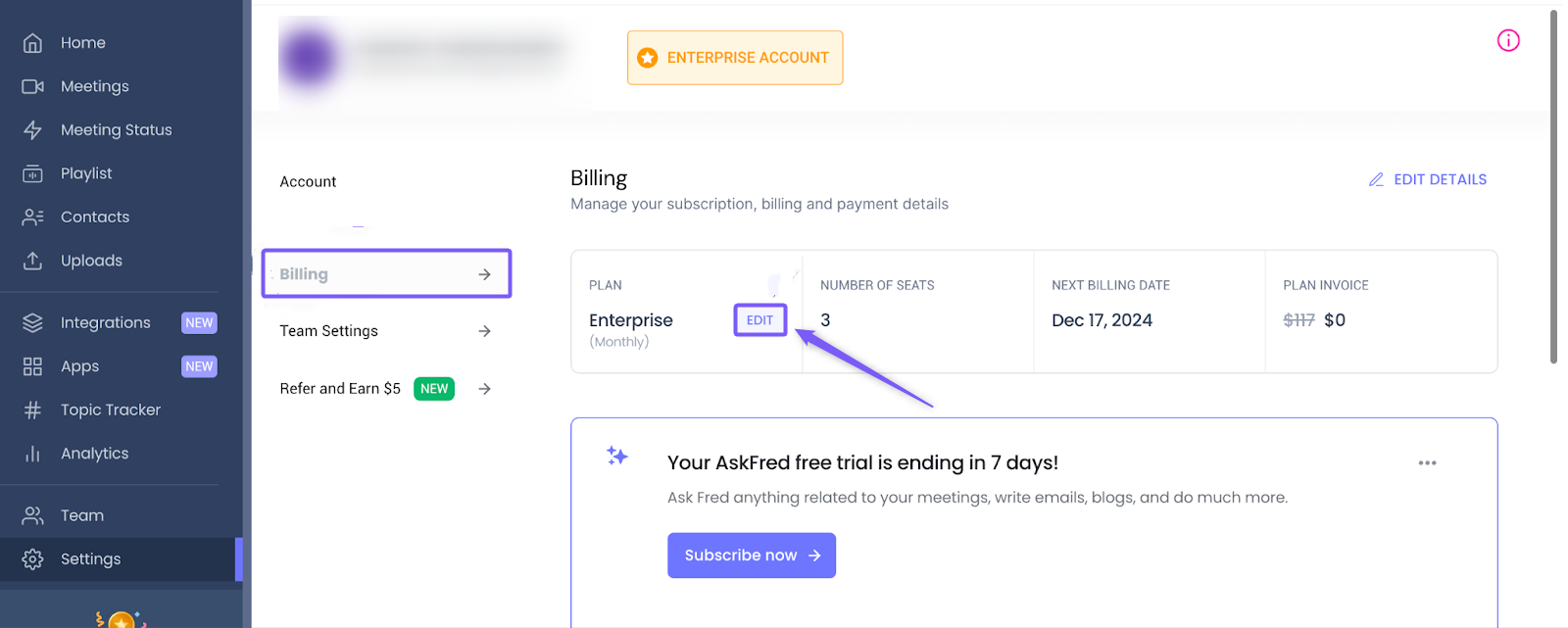
Go to the Billing section, click Edit, and select the plan you want to downgrade to.
The price difference will be converted into credits and applied to your next billing cycle.
You can also request a refund, and the difference will be credited according to the refund policy.
Related: How to downgrade Fireflies subscription
2. What payment options are supported?
Fireflies uses Stripe for payments.
You can pay using a credit or debit card.
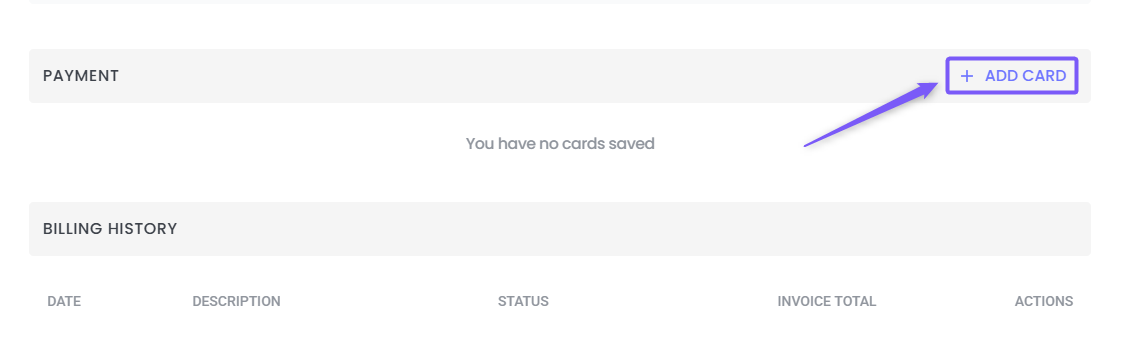
Add your card to enable automatic charges based on your invoice details.
Fireflies Billing FAQs: Charges, Invoices, Refunds, and Plan Changes
Billing questions can pop up at any time, and we want to make sure you have complete clarity on your account. This guide answers the most common questions about trials, seat-based billing, invoices, and plan changes so you can manage your subscription with total confidence.
💡 Note: This guide is part of our broader documentation on Manage Fireflies account subscriptions, billing, and refunds.
🔑 Prerequisites
Role: Most billing actions require you to be a Workspace Admin or the designated
Billing Admin. Standard users cannot access the Billing tab.
💳 Billing & Additional Charges
1. Why was I charged after my free trial?
If you don’t cancel your subscription before your 7-day trial ends, Fireflies automatically transitions you to a paid plan. This ensures your team experiences no interruption to your premium features.
To avoid charges: Cancel your trial before the end date. (📌 Related: How to cancel the Fireflies free trial)
If you were already charged: Contact Fireflies Support to request a review. Refunds may be full or prorated depending on our refund policy and your usage.
2. Why was I charged for inviting teammates?
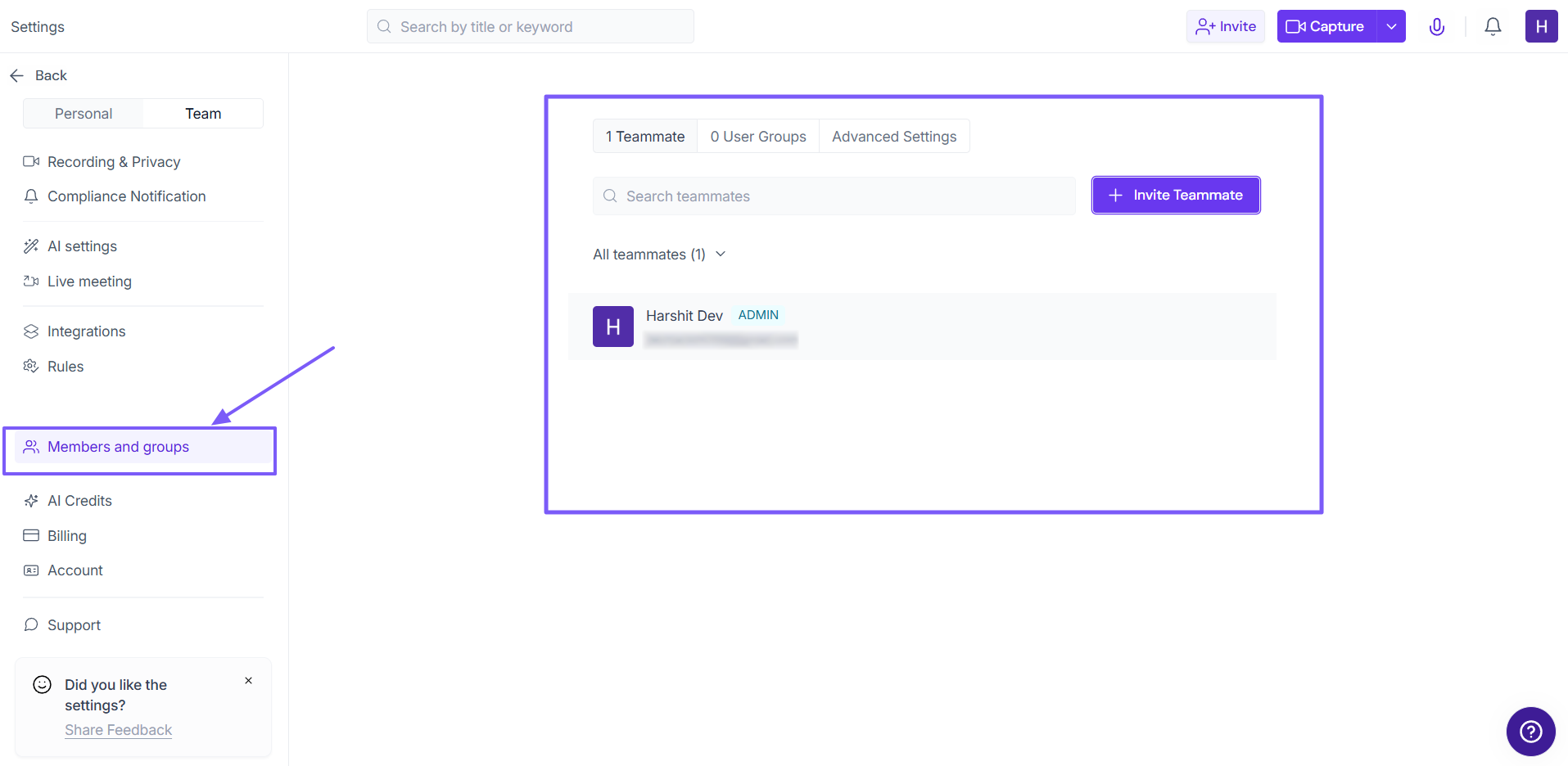
Fireflies uses seat-based billing. This means every teammate you add to your workspace consumes a paid "seat." Fireflies clearly shows an estimated charge warning when you invite teammates, so always double-check before sending invites.
If you see an unexpected charge, review your active workspace members and remove anyone who no longer needs access.
To review your workspace members, go to Settings from your Fireflies dashboard, click on Members and groups, and view your active users.
3. What exactly does a “seat” mean?
A seat represents one unique user in your workspace. Every active user—whether they are an Admin, an Editor, or a standard Member—counts as a billable seat.
(Related: Learn about the Fireflies Team feature)
4. Why is there an additional $5 charge on my invoice?
You will see this charge if you have an active add-on subscription for AI Credits. AI Credits provide access to advanced Fireflies features, including: AskFred, AI Skills Magic Soundbites, and Custom summaries.
For users on paid plans, AI Credits come with a free trial.
If you do not cancel the AI Credits subscription after the trial period ends, you will be charged an additional fee starting at $5 per month per user.
AI Credits are available on monthly or annual billing. Annual plans are priced 20% lower than monthly.
Your monthly credits limit stays the same on an annual plan — annual billing affects the price and renewal frequency, not the credits you receive each month.
Note: AI Credits are non-refundable. You can cancel them at any time from your Billing page to prevent future charges.
How to check or manage your AI Credits subscription:
From your Fireflies dashboard, go to Settings → Billing and scroll down to AI Credits.
Toggle off the switch next to "Once exhausted, auto-subscribe to 50 credits at $5/month"
To manage your subscription, click Edit next to your AI Credits package and select Edit Subscription.
To cancel your subscription, select Cancel Subscription and follow the prompts.
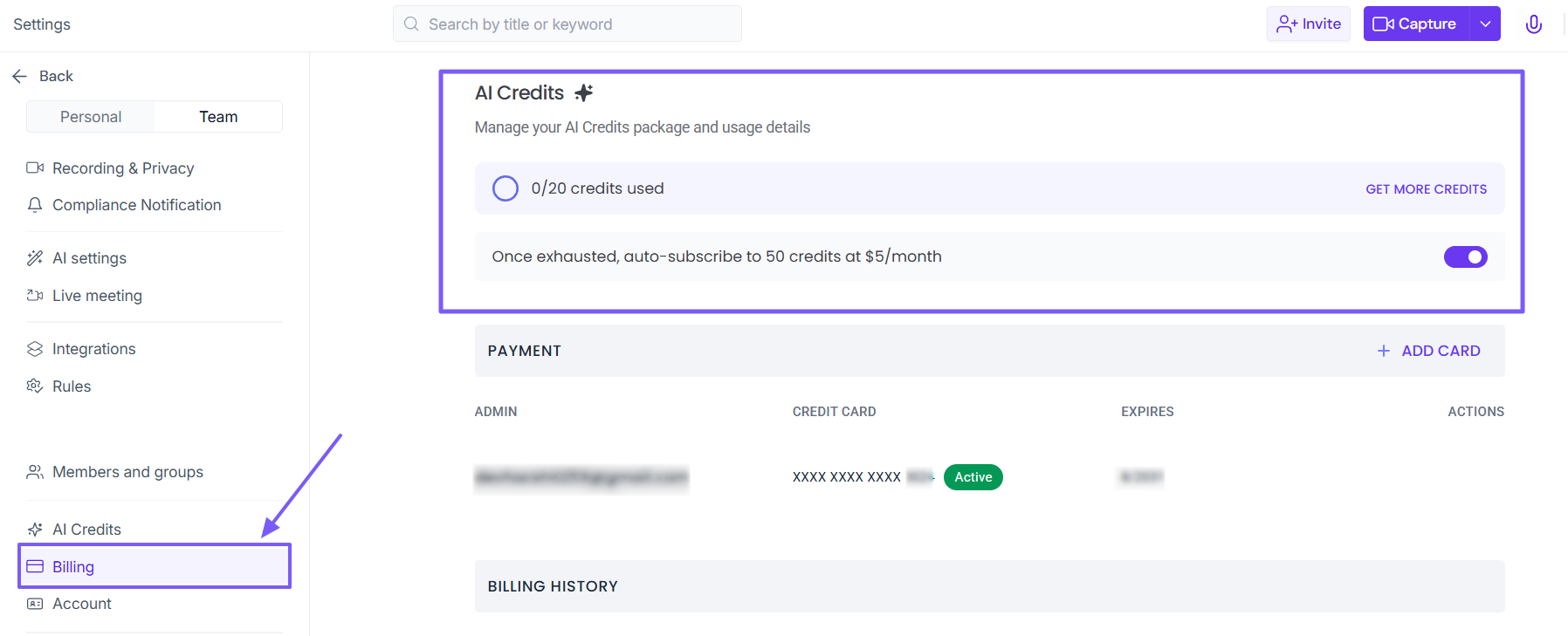
You will retain access to your existing credits until the end of your current billing cycle.
(Related: How to cancel AI Credits Subscription)
5. Can I get a refund for a billing charge?
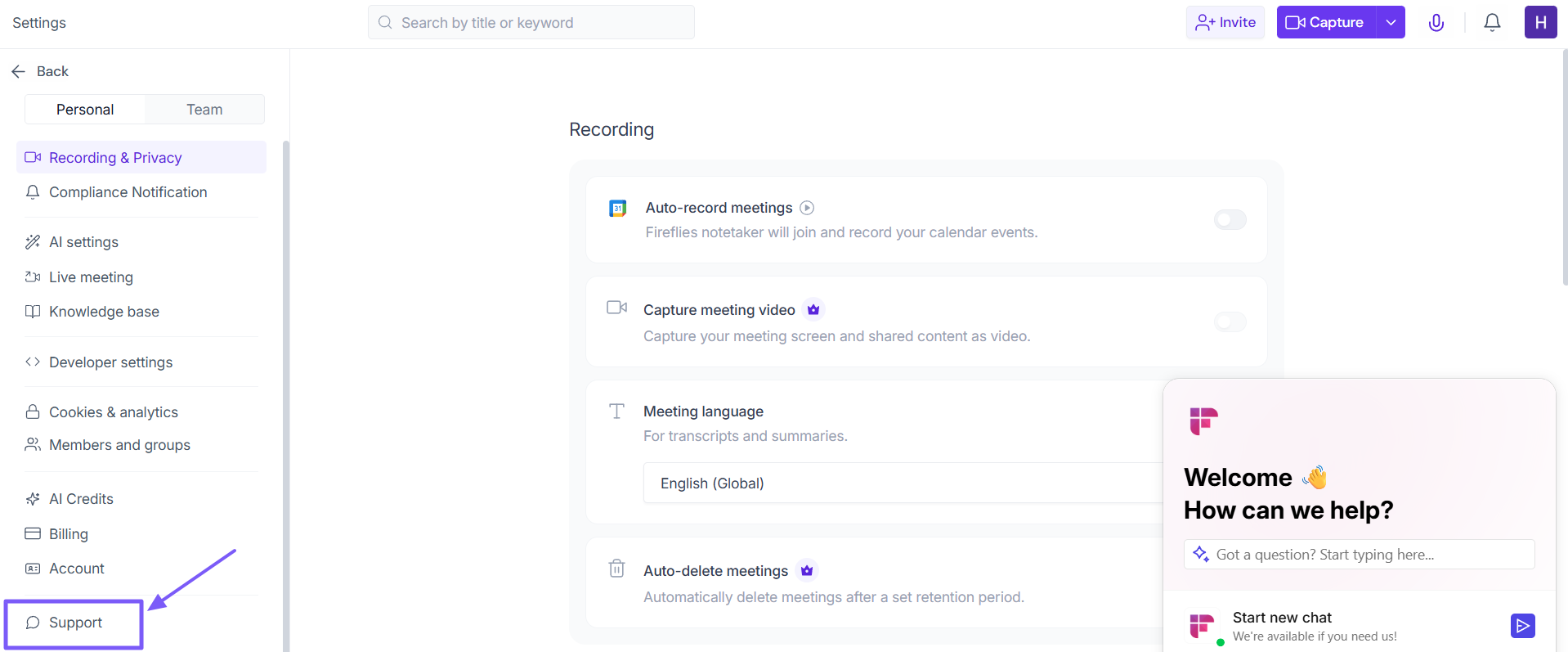
Refund eligibility depends on when the charge occurred, how much the product was used, and our Fireflies refund policy. If you believe a charge was a mistake, please reach out to Fireflies Support immediately for a review by clicking on Support button(located in lower left) under Settings.
🧾 Invoices & Billing Access
1. Where can I find my invoices?
All your past invoices and receipts are securely stored in your dashboard. From your Fireflies Dashboard Go to Settings > Billing, and scroll down to the Billing History section. Click the Download icon next to any invoice to save it as a PDF.
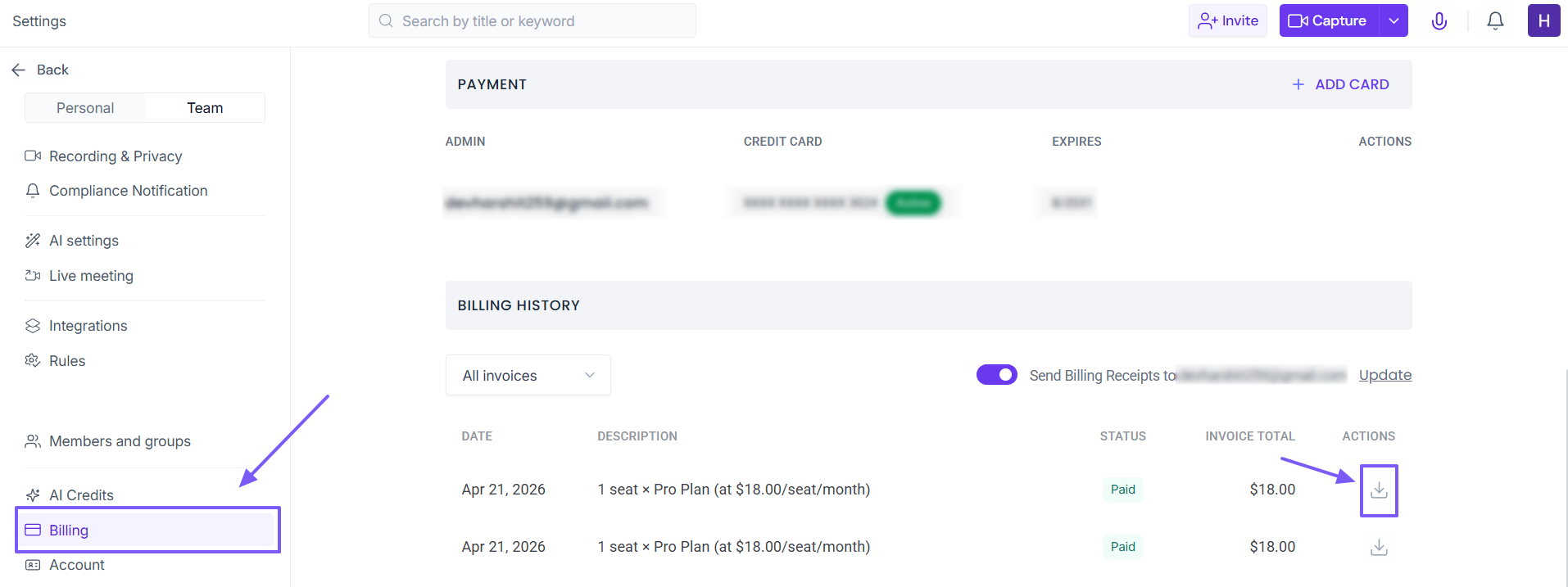
(Related: How to view invoices and bills)
2. Can I edit my billing address or company name?
Yes. From the Billing page, click Edit Details at the top right. You can update your company name, billing address, and Tax ID so they reflect correctly on all future invoices.
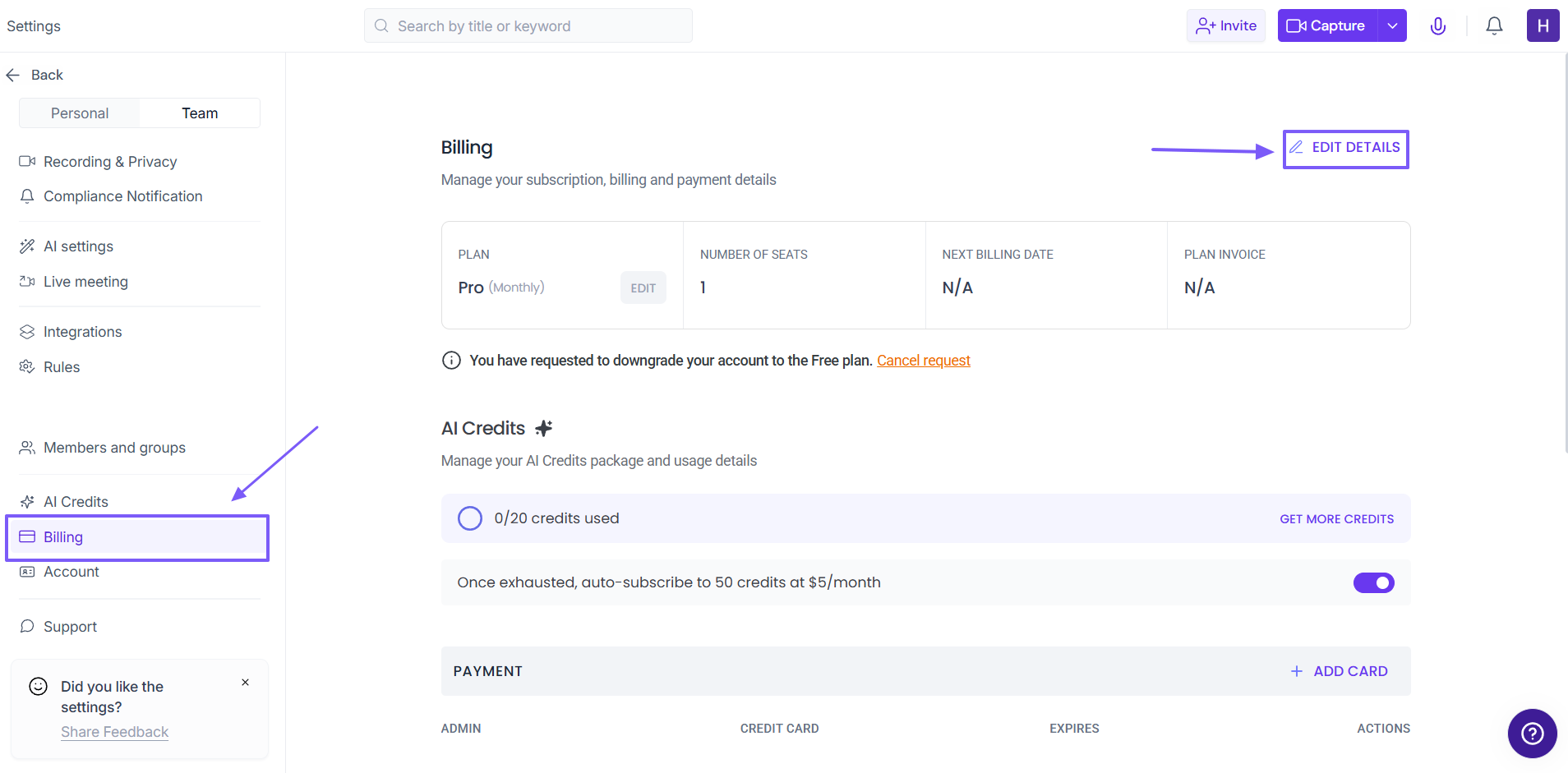
(Related: How to edit billing details in Fireflies)
3. Why can’t I access my billing page?
Only users with Admin or Billing Admin permissions can view this page. If you are a standard team member, the Billing tab will be hidden to protect your company's financial data.
4. Can I send invoices to my finance team's email automatically?
Yes! Scroll down to the Billing History section, toggle on Send Billing Receipts, and click Update to enter specific email addresses (like accounting@yourcompany.com).
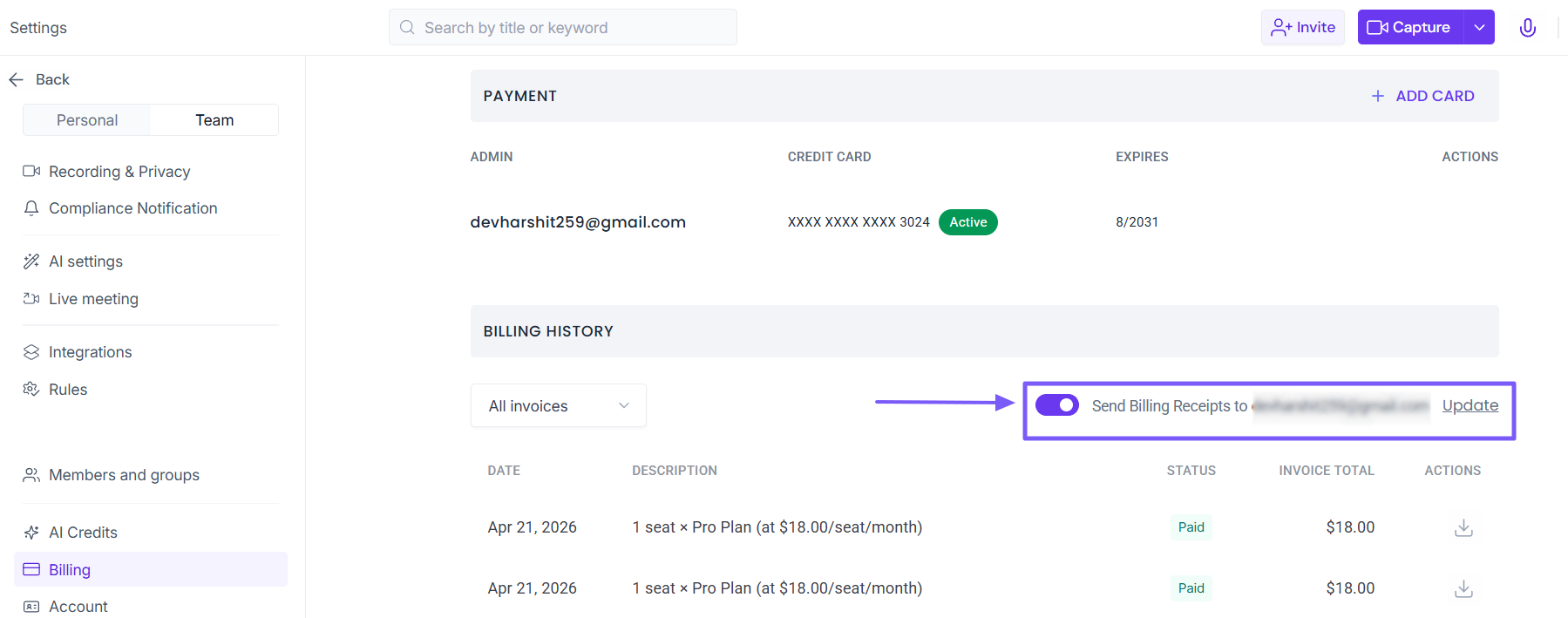
Related: How to send a Fireflies invoice to a different email address
🔄 Plan Changes & Payments
1. Can I downgrade my Fireflies plan after purchasing?
Yes. You can scale back your plan at any time. Go to Settings > Billing, click Edit next to your plan, and select the lower tier. The price difference for your unused time will automatically be converted into account credits and applied to your next billing cycle.
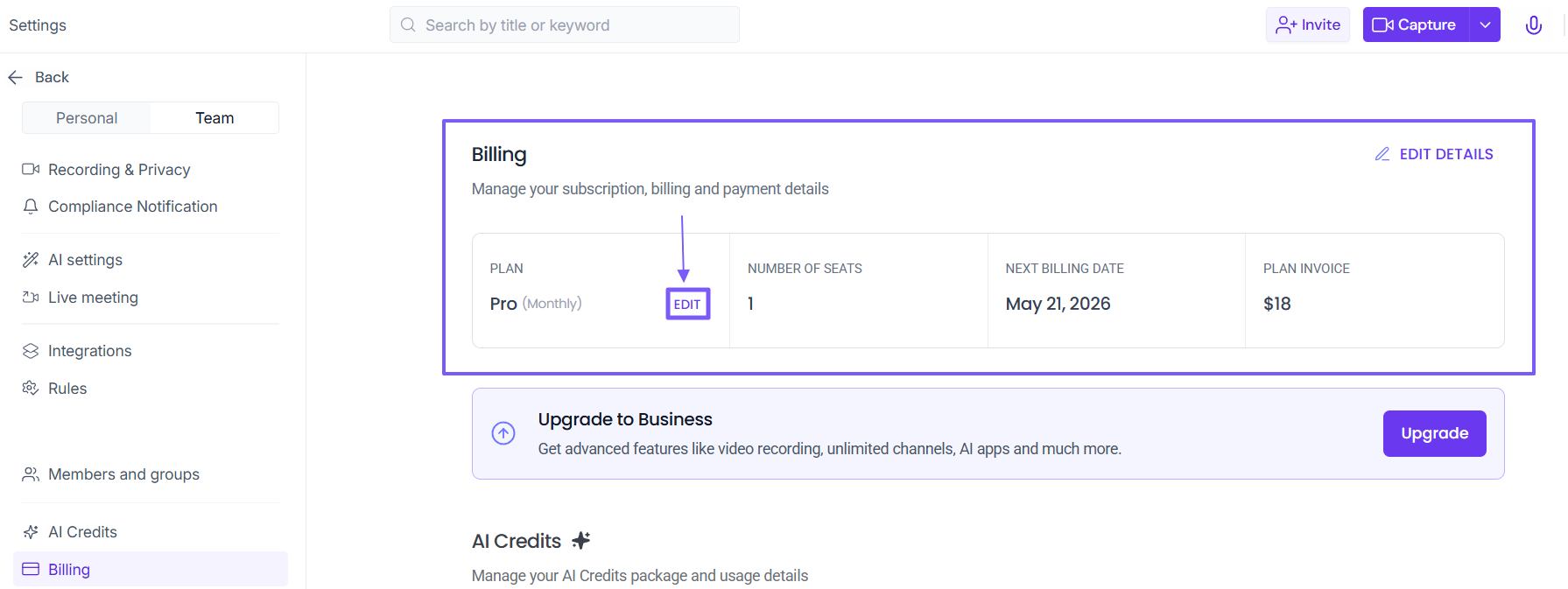
Related: How to downgrade your Fireflies subscription
2. What payment options do you support?
Fireflies uses Stripe as our secure payment gateway. We accept all major credit and debit cards (Visa, Mastercard, American Express, Discover). Simply add your card to enable automatic, hassle-free subscription renewals.
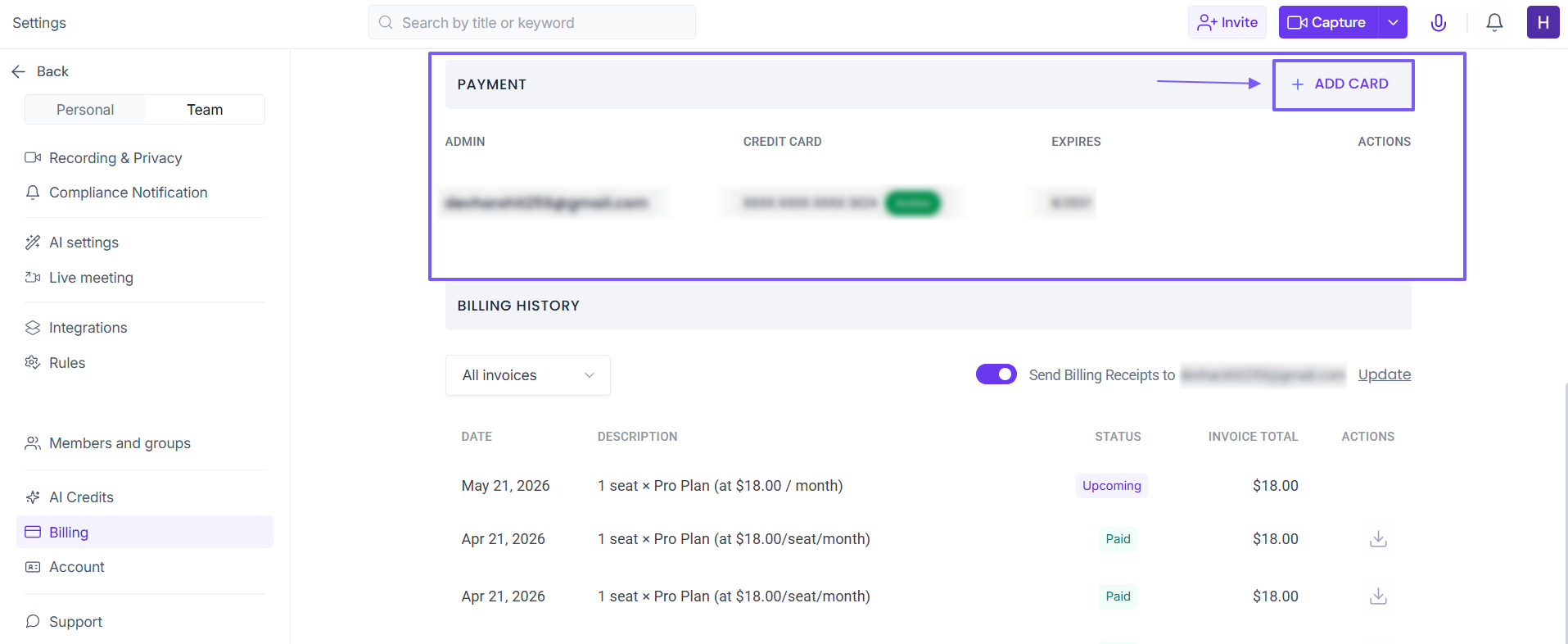
Related: How to change payment method for Fireflies subscription