Did not receive the meeting notes/ transcript? Troubleshoot transcription issues
Last updated: June 2, 2025
If you're missing a meeting transcript or it seems stuck in progress, don’t worry—this guide covers all possible causes and steps to fix them.
Need help figuring out why Fred didn’t join your meeting in the first place?
Check our full Fred did not join troubleshooting guide →
🚫 Didn’t receive the meeting transcript
Here are the most common reasons and what to do:
1. 🔧 Your Auto-Join Settings are blocking Fred
If your Auto-Join is set to “Only when I invite fred@fireflies.ai,” and you forgot to add Fred to the invite, Fireflies won’t show up—so no transcript.
join by inviting fred@fireflies.ai
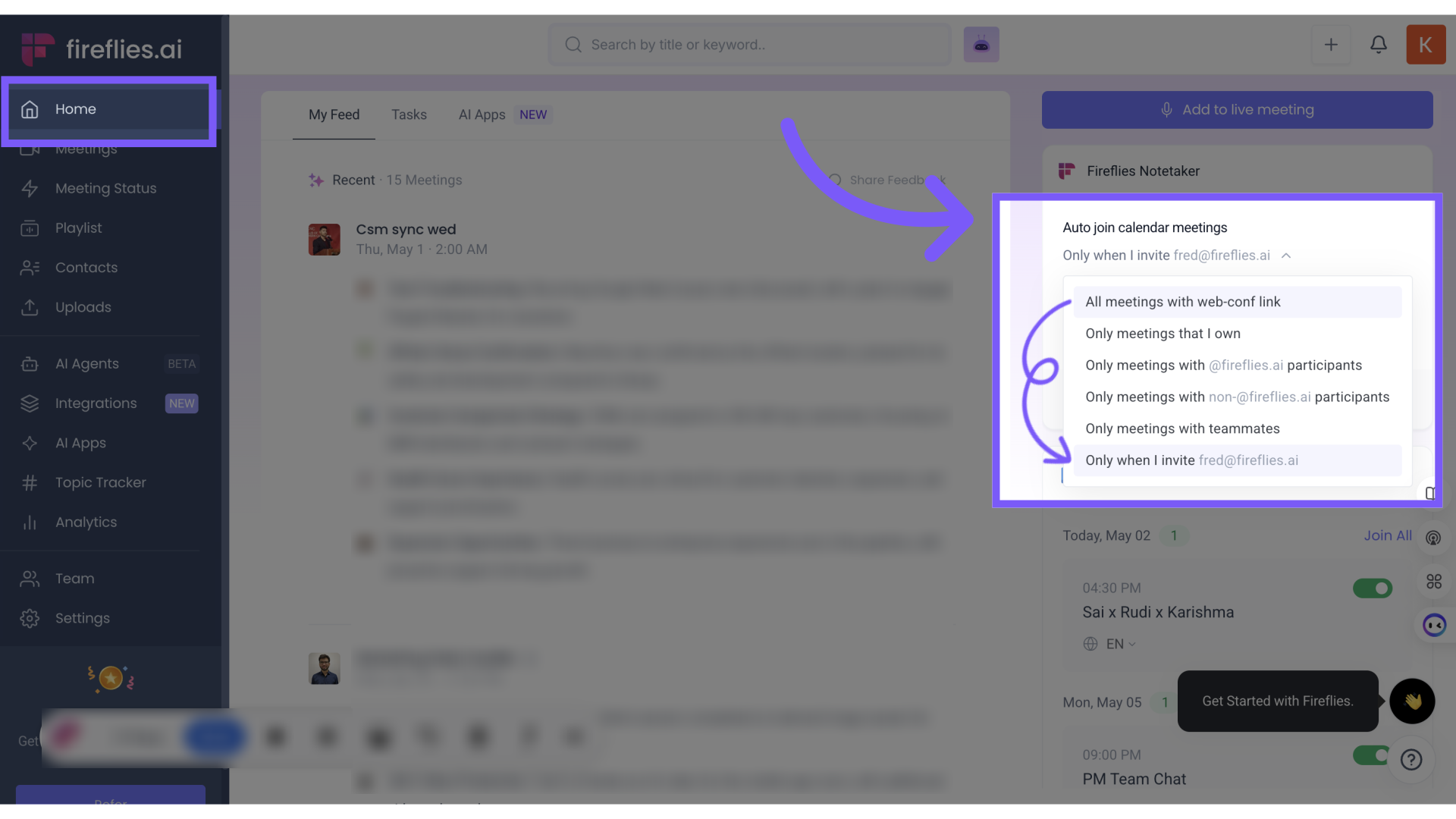
✅ Fix it:
Update your preferences under Settings > Meeting Settings > Auto-Join.
2. 👤 You were not the host, and the meeting recap privacy was set to "Only host"
If you attended the meeting but didn’t host it—and the host has recap sharing set to “Only owner”—you won’t see the transcript

✅ Fix it:
Ask the host to change the recap privacy setting or share the meeting manually with you.
3. ⏳ The meeting is still processing
It can take 5–10 minutes for your transcript to be generated after a meeting. Go to your Fireflies dashboard and check the status under Meeting Status.
If the status is still “In Progress,” give it some time.
4. 🕒 Meeting was too short
Fireflies doesn’t process meetings that last less than 3 minutes. So if your call ended quickly or Fred was removed early, there won’t be a transcript.

5. 🛑 Fred was denied entry or blocked by platform settings
If Fireflies wasn’t allowed into the meeting (stuck in waiting room, denied recording, login required, etc.), the bot couldn’t record anything.
✅ Fix it:
Check the Meeting Status page to see if Fred tried to join and was blocked. Look for error messages like:
❌ “Login or Captcha required”
❌ “Host declined recording permission”
❌ “Meeting requires sign-in”
❌ “Waiting room: no one let Fireflies in”
✅ Use the setup guides to fix these:
🌀 Transcription progress is stuck or slow
If your meeting shows “In Progress” for too long or the transcript isn’t loading:
1. 🌐 Check your internet connection
Ensure you have a stable Wi-Fi or LAN connection. If you were on mobile data or switched networks mid-call, processing may slow down.
2. 📥 Transcript is large and still loading
Longer meetings or calls with multiple speakers can take longer to process and display in your Notepad.
✅ Tip:
Wait a few more minutes. Refresh the Notepad or open the meeting again.
3. 🧼 Clear cache or try incognito
Try opening your Fireflies dashboard in an incognito window or clear your browser cache. Sometimes browser-side issues prevent transcript loading.
✅ Recap: Troubleshooting checklist
Problem | Quick Fix |
Didn't invite Fred? | Use Auto-Join or manually add |
Meeting was too short? | Make sure calls are at least 3 mins |
No access to recap? | Check host’s sharing settings |
Transcript stuck? | Refresh, wait 10 mins, or try incognito |
Platform blocked Fireflies? | Check platform-specific settings |
Fred didn’t join at all? |