How to Downgrade Your Fireflies Subscription
Last updated: July 10, 2026
Looking to switch to a lower Fireflies plan? Whether your team's needs have changed or you no longer need certain premium features, you can easily downgrade your subscription from your Billing settings.
This guide walks you through how to downgrade your Fireflies subscription, what to expect after the change, and how it affects your billing and workspace.
📌 Before You Downgrade
Before you downgrade your Fireflies subscription, keep the following in mind:
Paid Plan Required: Your workspace must be on a paid Fireflies plan to use the downgrade option.
Billing Admin Access: Only the current Billing Admin can change your workspace subscription plan.
Available Downgrade Options: Fireflies only displays the next available downgrade option for your current subscription plan.
Switching to the Free Plan: If you no longer need a paid plan and want to move to the Free plan, you'll need to cancel your subscription instead.
👉 Related: How to Cancel Your Fireflies Subscription
Billing Changes: Your current plan will remain active until the end of your current billing cycle. Any unused amount from your existing plan will automatically be applied as credits toward future invoices.
Looking to reduce the number of paid seats instead?
If you want to stay on your current subscription plan and only reduce the number of paid seats, remove a teammate from your workspace to free up a paid seat.. See, How to Deactivate, Reactivate, and Remove Teammates in Fireflies for step-by-step instructions.
🚀 Follow These Steps to Downgrade Your Subscription
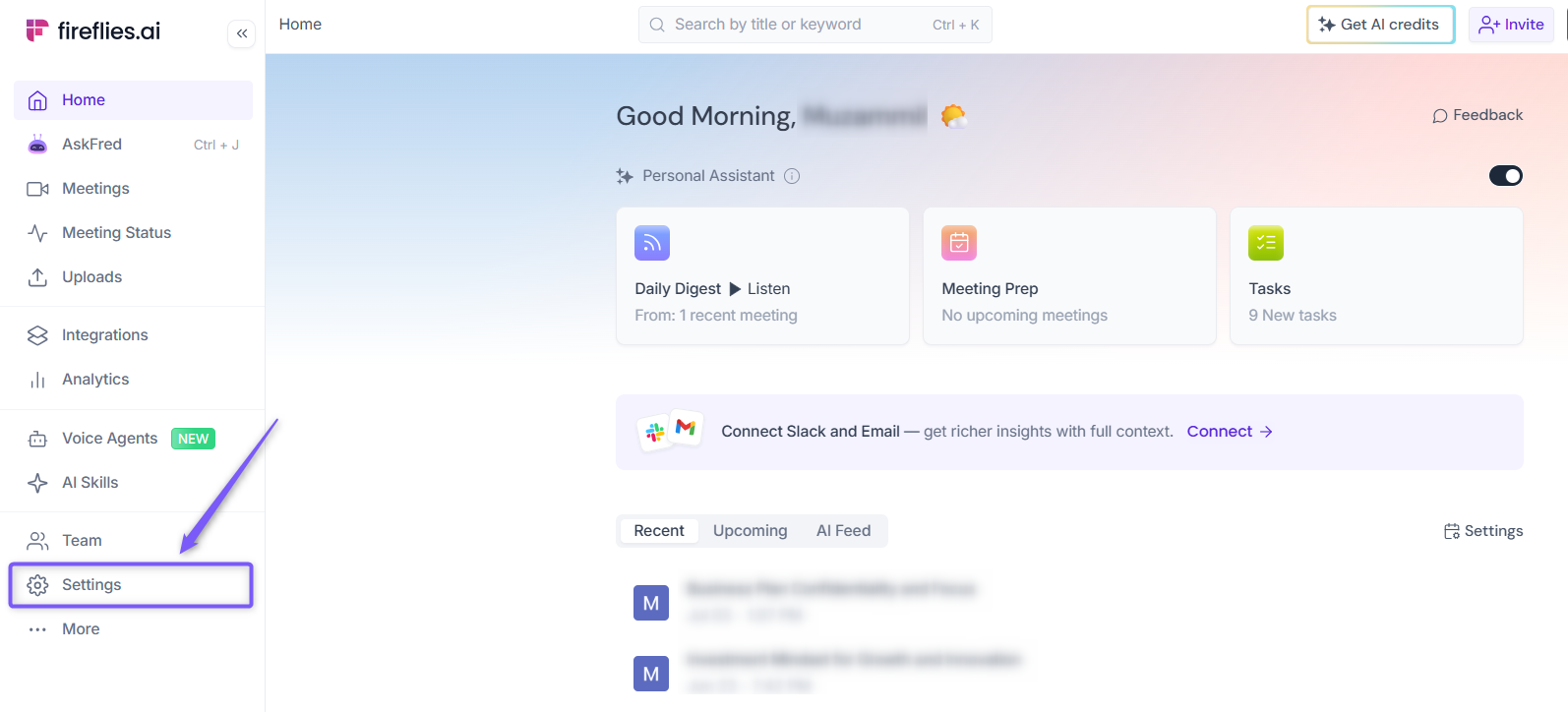
Step 1: Log in to your Fireflies account, open Settings from the left navigation menu.
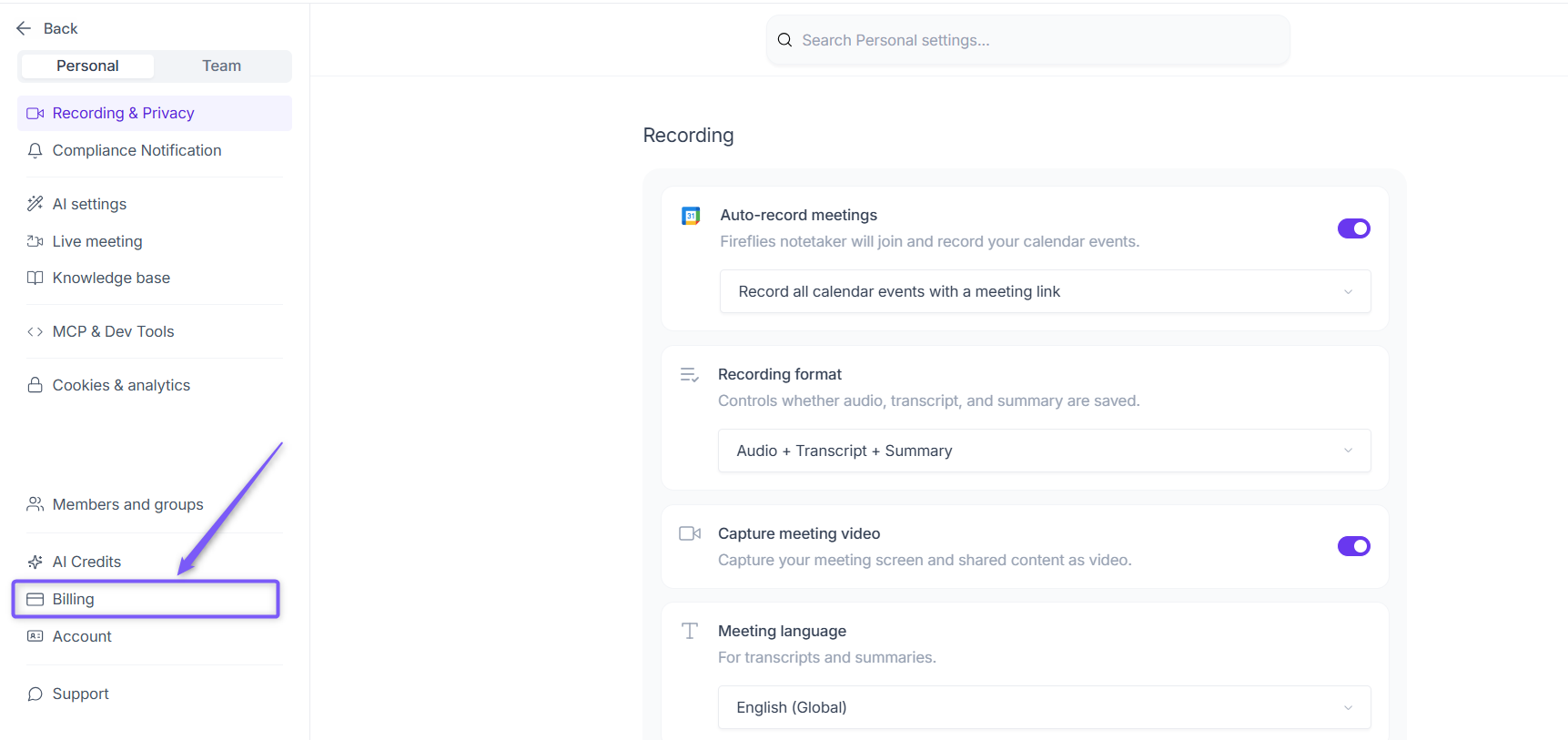
Step 2: Navigate to Billing from the left panel.
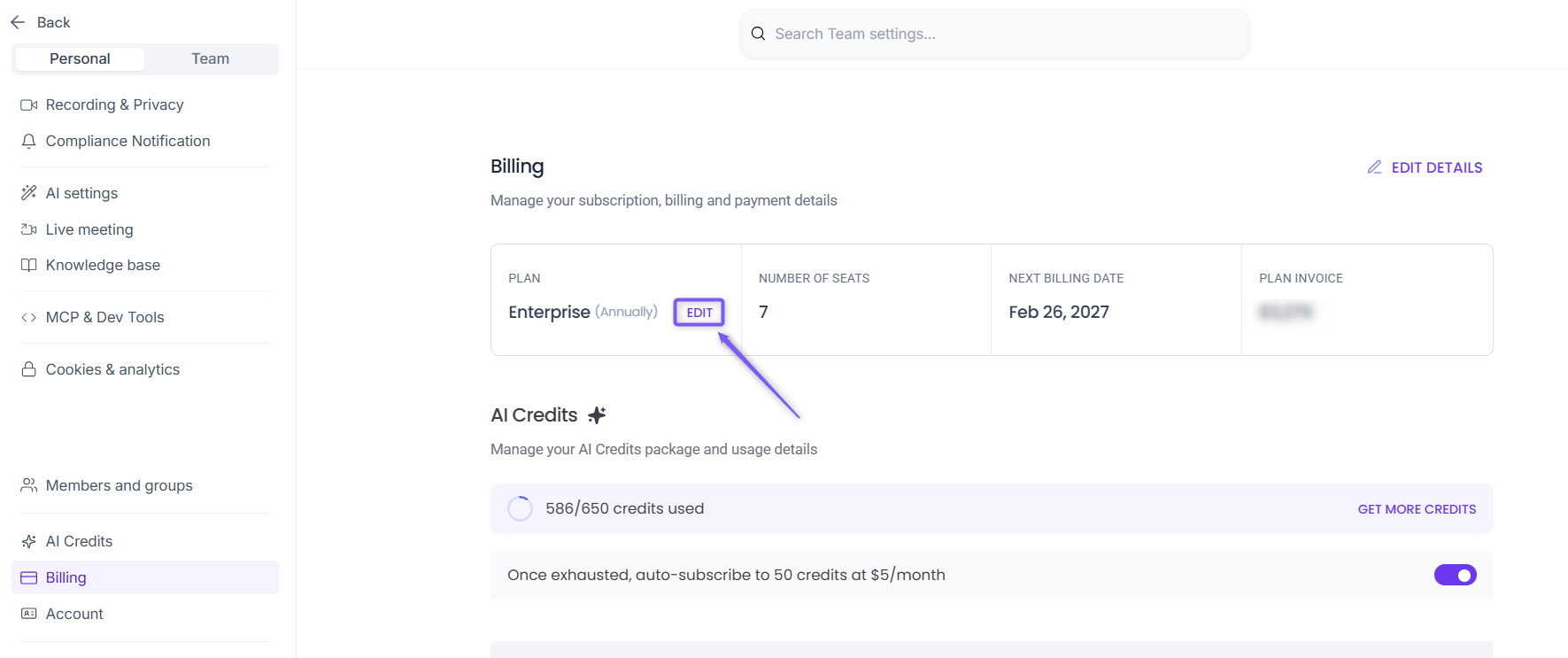
Step 3: Under your current subscription plan, click EDIT.
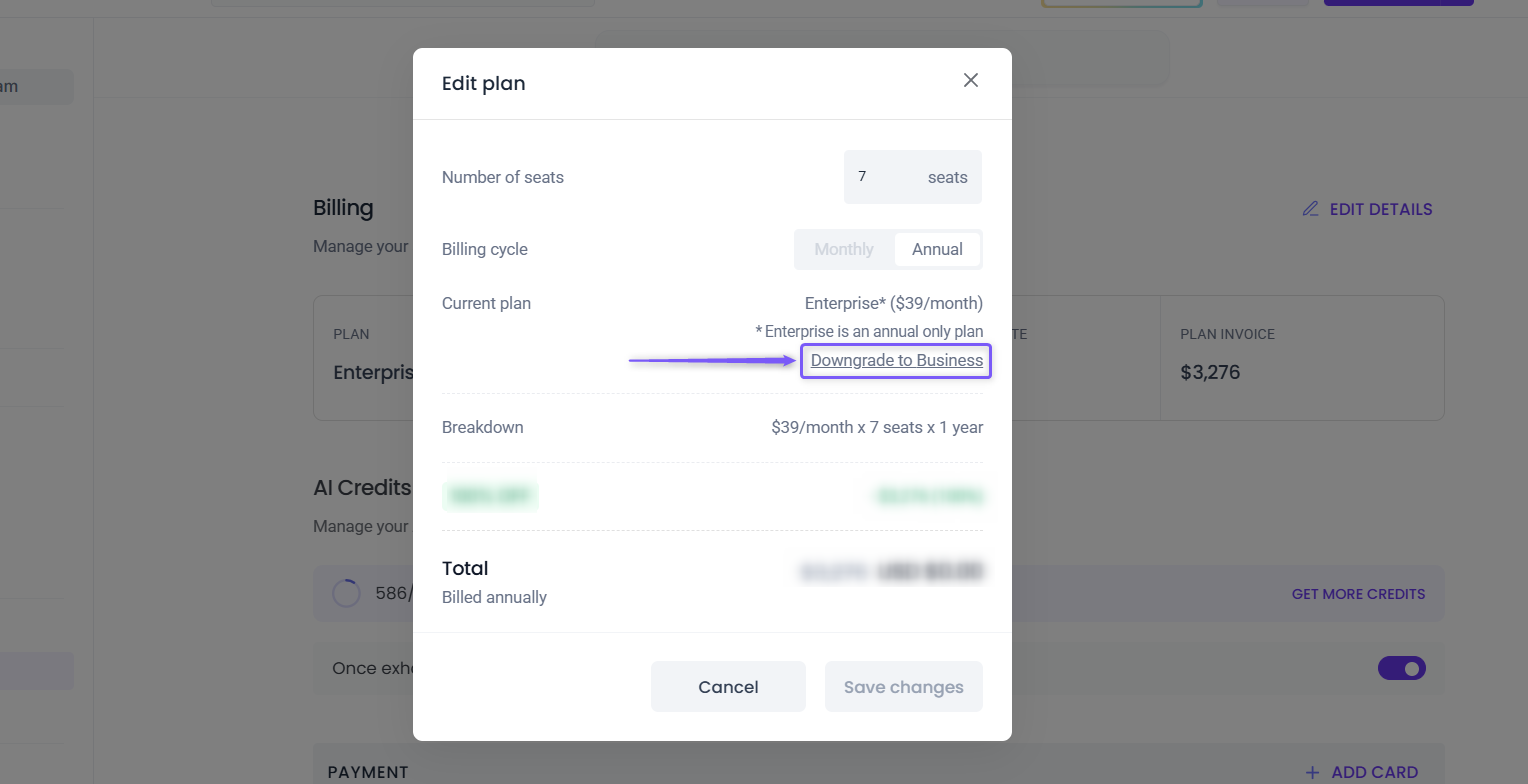
Step 4: A dialog box appears. Review your current subscription details before proceeding to the next step. The table below explains each field and its description.
Field | What it means |
|---|---|
Number of seats | Shows the number of paid seats in your workspace. You can increase this number here, but you can't decrease it. To reduce your paid seats, remove a teammate from your workspace instead. |
Billing cycle | Your current billing cycle. Enterprise plans support annual billing only, marked with an asterisk (*) next to the plan name. |
Current plan | Your active subscription plan, along with the downgrade option available for your workspace. |
Breakdown | Shows how your current subscription cost is calculated based on your plan price, number of paid seats, and billing period. |
Total | Shows the total amount after any applicable discounts, credits, or billing adjustments are applied. |
💡 Need fewer paid seats instead of a lower plan?
You can stay on your current plan and remove a teammate from your workspace to reduce your paid seat count. See How to Deactivate, Reactivate, and Remove Teammates in Fireflies
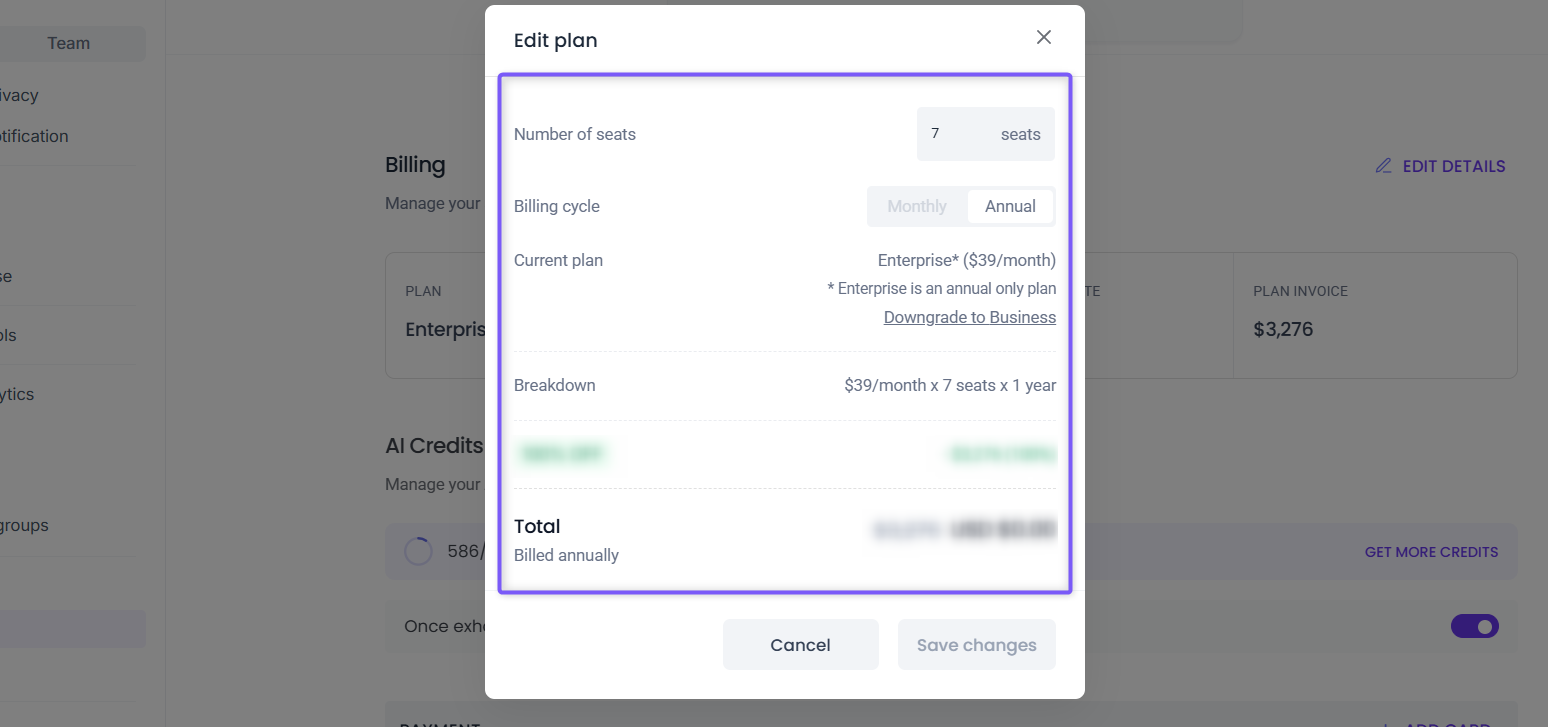
Step 5: Click Downgrade to [Plan Name]. Fireflies displays the next available downgrade option based on your current subscription plan.
For example, if you're on the Enterprise plan, you'll see Downgrade to Business. If you're on the Business plan, you'll see Downgrade to Pro.
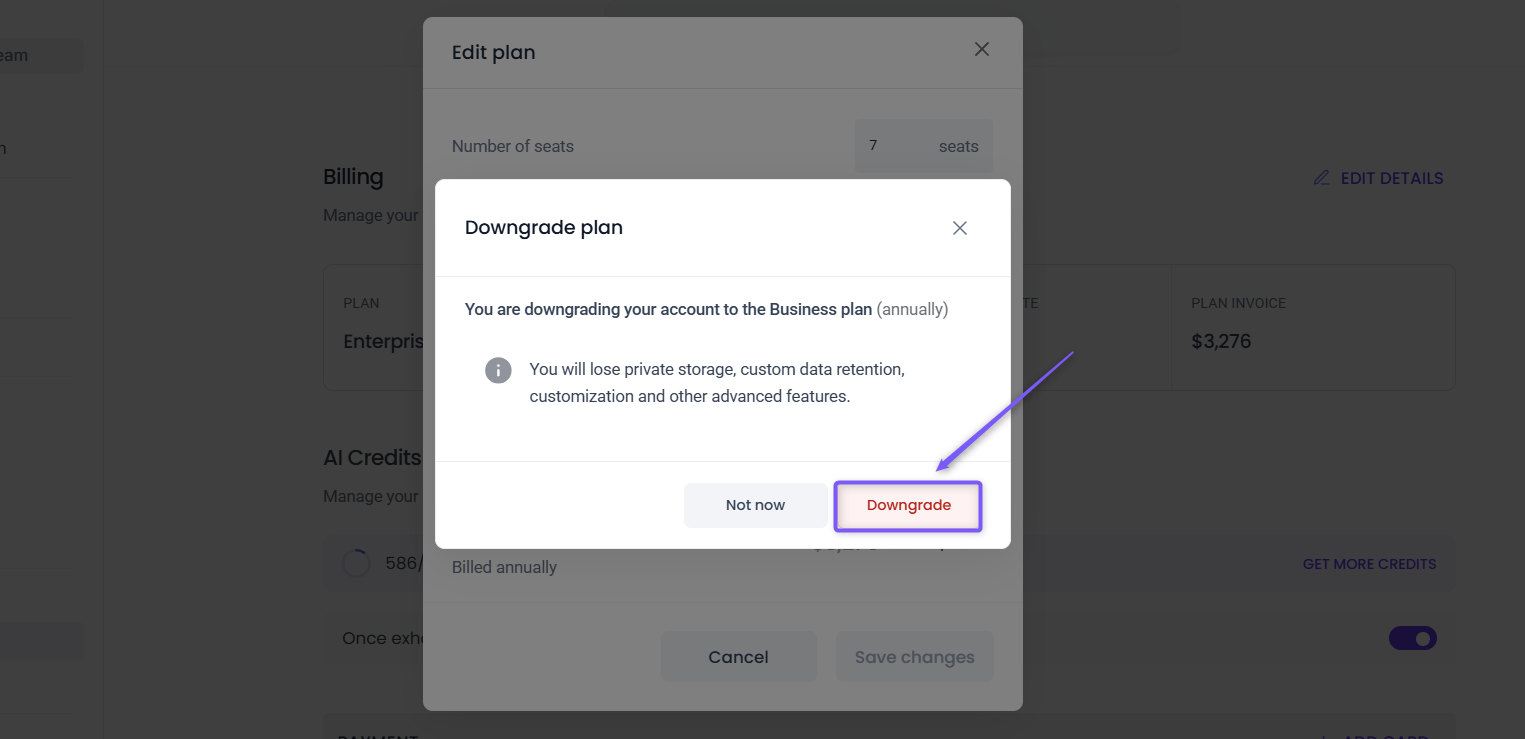
Step 6: Before you confirm, review the confirmation dialog:
What changes: The features you lose depend on the plan you're downgrading to.
Enterprise → Business: you'll lose Enterprise-only features, but keep everything included in Business.Business → Pro: you'll lose Business-only features, but keep everything included in Pro.
Not sure what you'd be giving up? See Learn About the Fireflies Pricing Plans to compare plans side by side before you decide.
Your access isn't cut off right away. Your current plan stays active until your billing cycle ends. The downgrade only kicks in at the start of your next cycle, so there's no sudden loss of features.
Once you've reviewed everything, click Downgrade to confirm your changes.
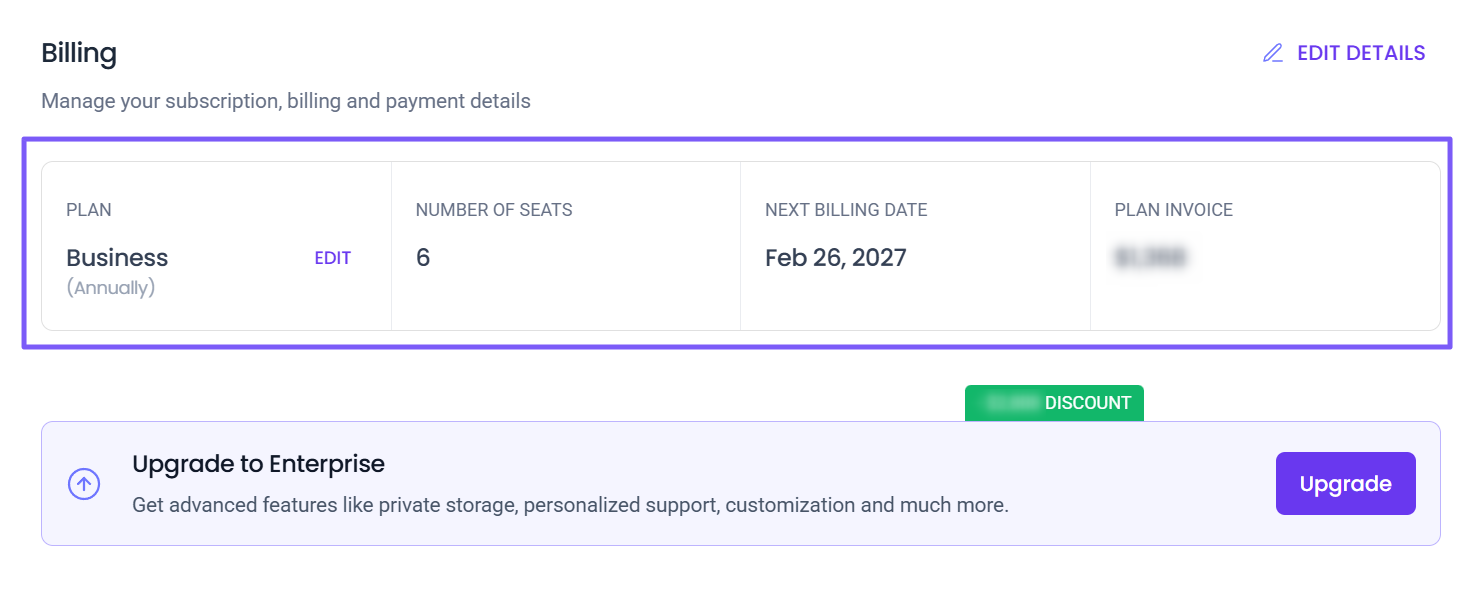
Step 7: Once confirmed, you're returned to the Billing page. Verify that the following details have been updated:
Plan: Your downgraded subscription plan.
Number of seats: Paid seats in your workspace.
Next billing date: When the downgrade takes effect and your next invoice date.
Plan invoice: Your updated subscription amount.
✅ What to Expect After Downgrading
Once your downgrade is confirmed, here's what happens next:
Current Plan Stays Active: You'll continue using your current plan until the end of your current billing cycle.
Automatic Plan Change: Your workspace will automatically switch to the downgraded plan when your next billing cycle begins.
Billing Credits Applied: Any unused amount from your current plan will automatically be applied as credits toward future invoices.
Feature Access Updates: You'll lose access to features that aren't included in your new plan once the downgrade takes effect.
Your Data Stays Intact: Your meetings, transcripts, recordings, and workspace data remain available. You'll only lose access to features that aren't included in your new plan.
Upgrade Anytime: If your needs change, you can upgrade back to a higher plan at any time from your Billing settings.
❓Troubleshooting & FAQs
Q1. I don't see the Downgrade option.
Only eligible downgrade options are shown based on your current subscription plan. Make sure you're signed in as the Billing Admin and your workspace is on a paid Fireflies plan.
Q2. When will my downgraded plan take effect?
Your current subscription remains active until the end of your current billing cycle. Your downgraded plan will automatically take effect when your next billing cycle begins.
Q3. Will I lose my meetings after downgrading?
No. Your meetings and recordings remain in your workspace. However, you'll lose access to features that aren't included in your new subscription plan.
Q4. What happens to the money I've already paid for my current plan?
Fireflies automatically calculates the unused portion of your current plan and converts it into account credits, which are automatically applied to your next billing cycle. If you'd like to learn more about refund eligibility and billing policies, see Understand Fireflies' Refund Policy.
Q5. I only want to reduce the number of paid seats. Do I need to downgrade?
No. If you want to stay on your current plan and only reduce the number of paid seats, remove a teammate from your workspace instead.
👉 Related: How to Deactivate, Reactivate, and Remove Teammates in Fireflies
Q6. Can I upgrade my subscription again later?
Yes. You can upgrade to a higher Fireflies plan at any time from your Billing settings.
👉 Related: How to Upgrade Your Fireflies Subscription
📌 Related Guides
Want to learn more about managing your Fireflies account, subscription, and billing? Check out these related guides:
If you have any questions or need assistance, please don’t hesitate to reach out. We’re here to help!
Click the chat button (purple) in the bottom-right corner of your Fireflies home dashboard to start a conversation, or contact our support team.