How Fireflies.ai keeps your information safe
Last updated: October 14, 2026
Trust is everything when it comes to your conversations. At Fireflies, we prioritize your privacy and security, ensuring you always have control over your data. This guide outlines how we safeguard your information.
Want a quick walkthrough first? Watch this privacy and data webinar to see how recording and restriction rules decide which meetings get captured, how everyone is notified when recording is on, how to control who sees a meeting afterward, and where your data is stored. Then follow the steps below to lock down your workspace.
Your Data, Your Control
At Fireflies, we believe privacy is a fundamental human right — and that belief guides every decision we make about privacy and security.
No AI Training. Ever.
Your meeting content — including audio, video, transcripts, and summaries — is never used to train any AI models. We enforce a Zero Data Retention policy, meaning:
No storing: Your data is not stored by any third-party vendors after processing
No accessing: Vendors do not retain access to your data once the service is delivered
No training: Your data is never used to train AI models, internally or externally
This commitment extends to all our trusted partners, including transcription providers and services like OpenAI and Anthropic. Our Zero Day Retention vendor agreements strictly uphold these standards.
This also means that we adhere to the Google User Data Policy, included the Limited Use requirements. Raw or derived user data received from Google Workspace APIs is not used to train foundation models.
Fireflies.ai acts solely as a data custodian — you retain full ownership and control of your data. Internally, our teams do not have access to your meeting content by default. Any access requires your explicit permission, typically granted for support-related purposes only.
How we meet compliance standards
Fireflies.ai adheres to leading compliance frameworks to protect your data and support your regulatory needs:
SOC 2 Type II: Independently audited annually to validate our security, privacy, and data integrity controls
ISO/IEC 42001: Independently certified for responsible AI governance
GDPR: Full compliance with EU data protection regulations to uphold user rights and transparency
HIPAA compliant: We meet all HIPAA requirements for handling healthcare data:
Signed BAA: Business Associate Agreements (BAAs) are available for complete protection of PHI
Private Storage for data locality (Enterprise-only)
FERPA compliant: Support for safeguarding student education records at educational institutions
Signed DSA: A Data Sharing Agreement (DSA) is available to support FERPA requirements
Private Storage for data locality (Enterprise-only)
🔒For detailed documentation, visit our Trust Center
SOC 2 & Enterprise-Grade Security
Fireflies.ai is built on a foundation of SOC 2-compliant practices, ensuring your data is handled with the highest standards of security and integrity. Our infrastructure includes:
End-to-end encryption:
AES 256-bit encryption for data at rest and TLS 1.2+ for data in transitProactive vulnerability management:
Continuous automated scanning and a HackerOne-powered bug bounty programResponsible backups:
Regular backups of system configs and metadata (excluding sensitive meeting content)
These controls are designed to meet rigorous compliance and reliability standards — because keeping your data safe is non-negotiable.
Privacy built by design
You’re in control of your data — and we’ve built features that put privacy at the center:
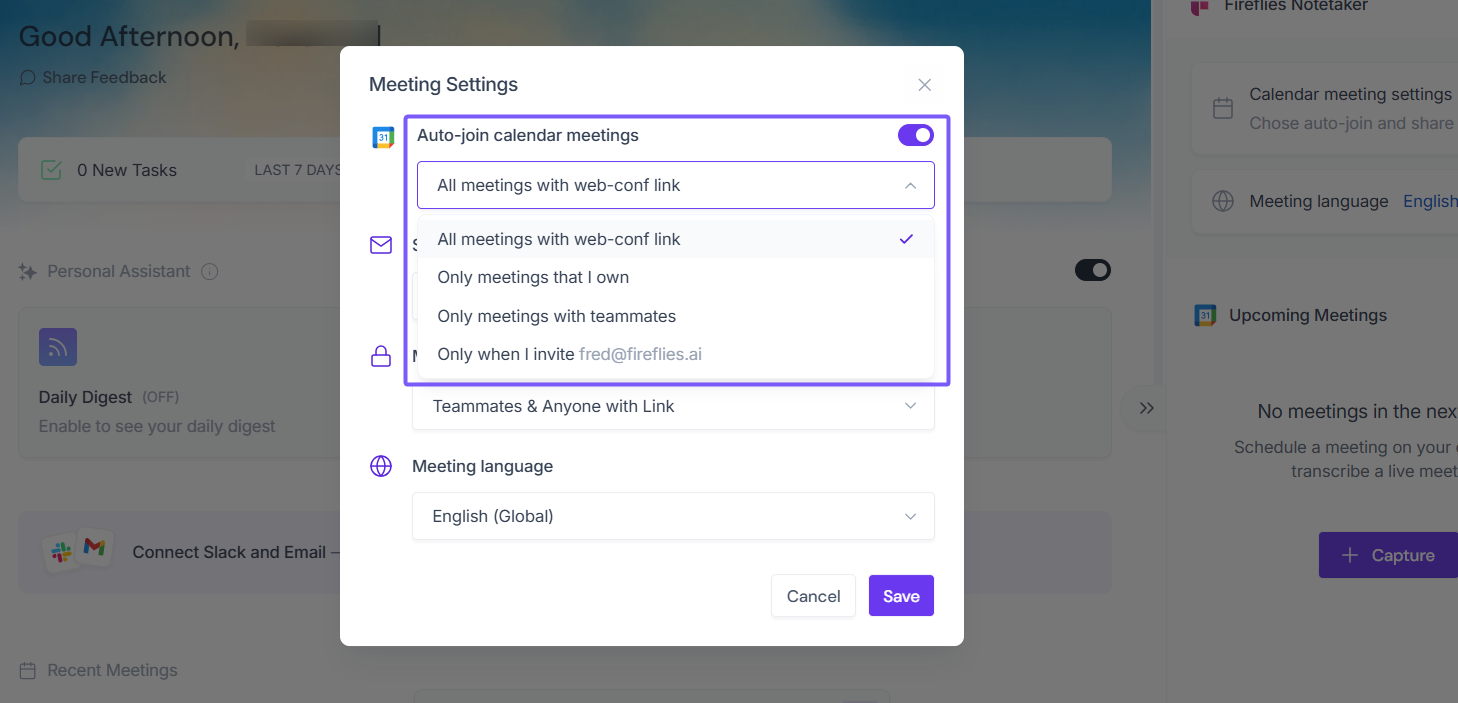
You control recordings: You (or the meeting host) choose which meetings are recorded
Related: Learn how to configure Auto-join settings and control which meetings Fireflies records →
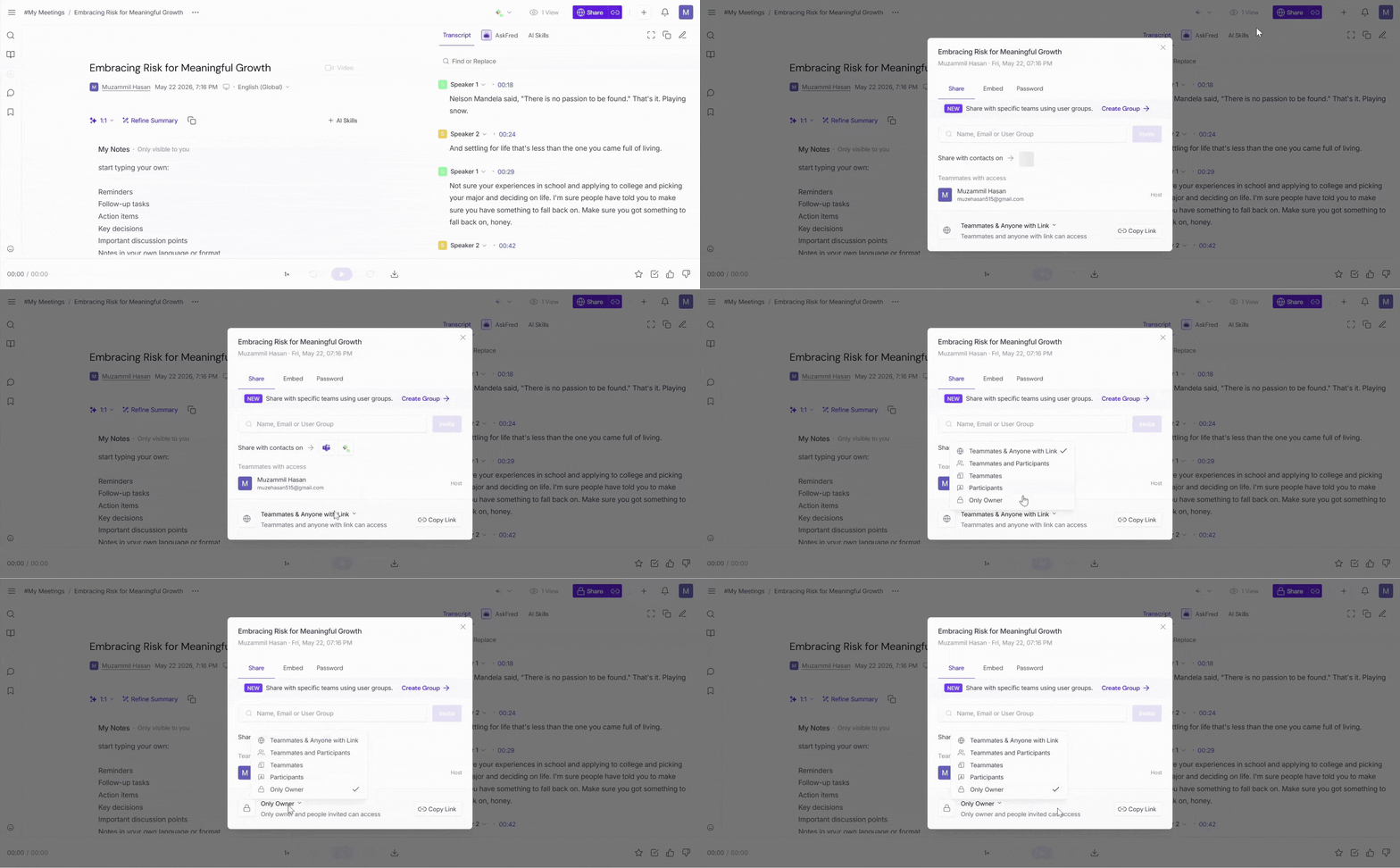
You manage access: Set visibility preferences from the Meeting Notepad — limit access to just participants, make it private, or share with a link.
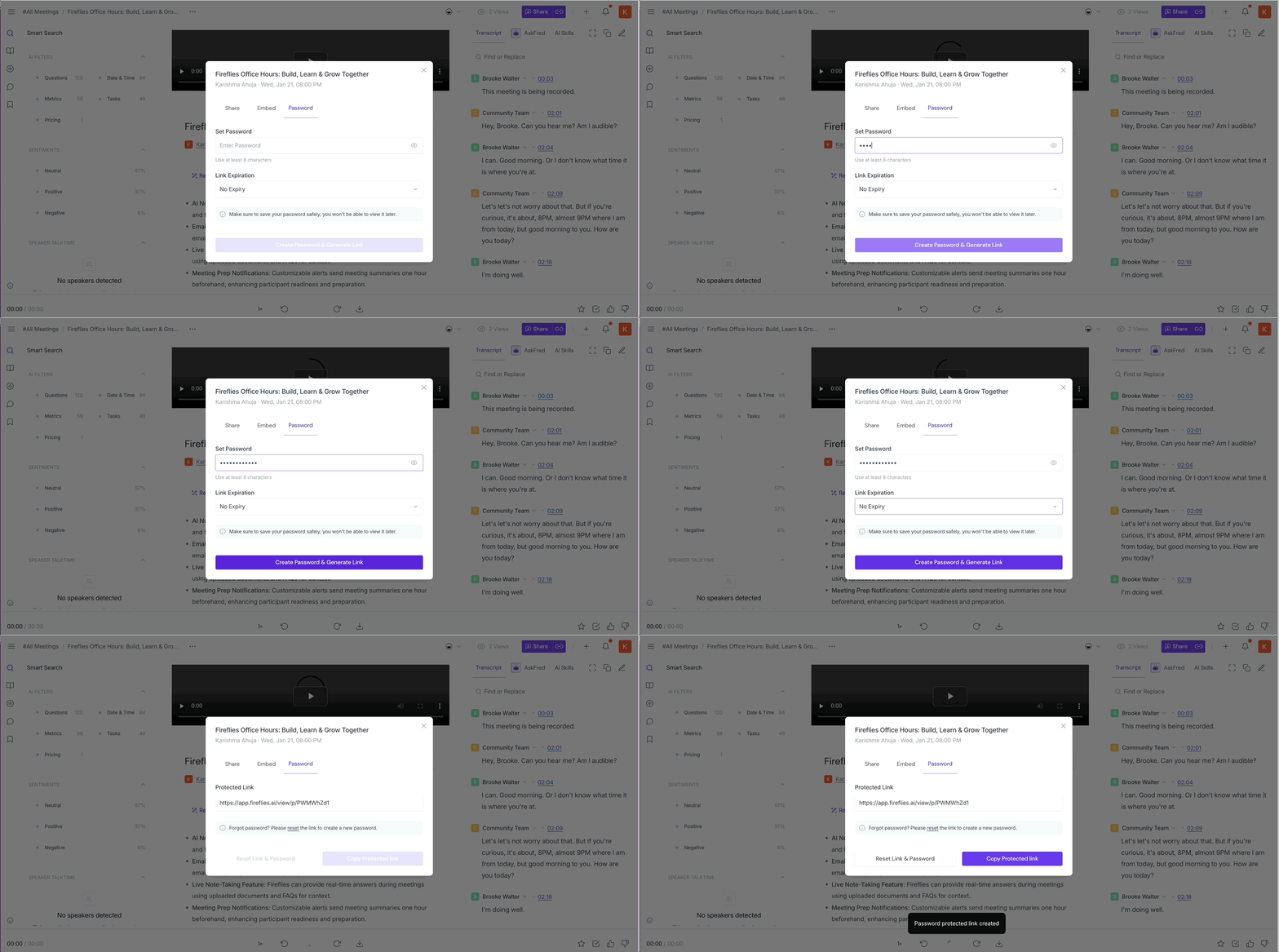
Secure external sharing: Share meetings with external users using a password-protected link while keeping meetings private. Set an expiration period to control how long the link remains active.
Related: How to Share a Fireflies Meeting with a Password-Protected Link →
Admin governance: Admins can manage data retention, control workspace access, and set user permissions through Groups
Rules Engine (Enterprise): Automate data governance with policies for recording, transcription, and retention across your organization
🚦Want to see how the Rules Engine works? Read more about this feature
👉 Need help with meeting privacy? See How to control who gets meeting recaps (Email Settings) and who can view them on Fireflies (Privacy Settings)
Making sense of it all
You own your data, and Fireflies.ai serves as a data custodian
Fireflies.ai's vendors operate under strict agreements to protect your data and never train on it
We use multiple security layers, including encryption and vulnerability management, to ensure your data stays safe
You have full control over recordings and access, with privacy settings tailored to your needs
🤔 Curious how the Super Admin role helps manage workspace permissions and security? Learn about the Super Admin role
🔐 Got more questions about security or compliance? Check our terms of service