Set up FERPA compliance for your workspace
Last updated: January 8, 2026
Enable Family Educational Rights and Privacy Act (FERPA) compliance in Fireflies to keep conversations involving student education records secure. Using the Security Checklist, you can set up FERPA compliance yourself and easily see what protections are in place—without needing to contact support or manage complex configurations.
🔐 Why use the Security Checklist?
The Security Checklist in your Team Settings shows you exactly how your workspace is protected. Instead of guessing whether compliance is set up correctly or reaching out to support, you can quickly check your status and manage everything in one place.
It’s designed to make security and compliance simple, clear, and self-service.
Key benefits
🔍 Clear compliance visibility
You can instantly see whether FERPA compliance is enabled for your workspace. No searching through settings or documentation—everything you need is visible at a glance.
⚡ Self-service setup and management
You can set up and maintain FERPA compliance directly from your dashboard. The checklist guides you through each requirement and updates in real time as your workspace changes.
✅ What you'll see in your Security Checklist:
Zero Data Retention & Data is Private – Ensures your data is not stored after processing and is never used to train AI models.
SOC 2 Type II · GDPR – Confirms Fireflies meets industry-standard security and privacy controls. The SOC 2 Type II report is available after signing an NDA.
HIPAA Compliance – Confirms Fireflies meets healthcare data protection requirements.
FERPA Compliance – Confirms Fireflies meets education data protection requirements.
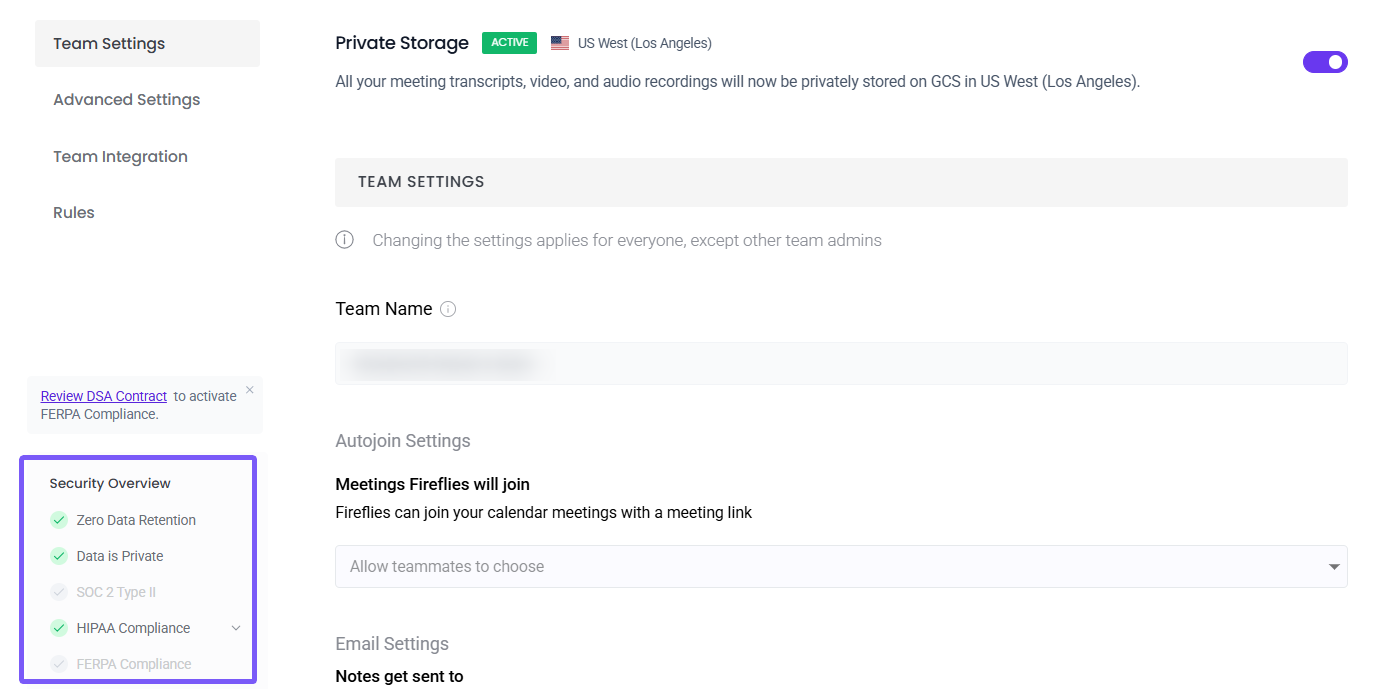
📌 FERPA compliance requirements
FERPA compliance in Fireflies requires two essential components to protect student education records.
Enterprise plan requirement
FERPA compliance is available only on Enterprise plans. If you’re on a lower plan, you’ll need to upgrade before proceeding.
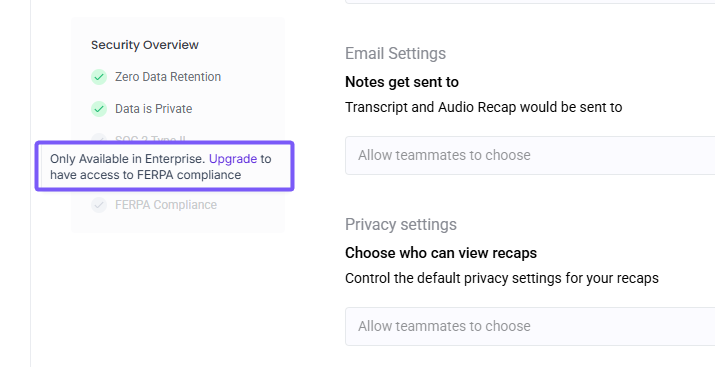
Compliance checklist for Enterprise users
Once you’re on an Enterprise plan, you’ll see a two-step checklist:
Requirement | Why it's needed | Action |
Private Storage | FERPA requires student data to be stored in a dedicated, private infrastructure | Set up Private Storage |
DSA (FERPA) | The Data Sharing Agreement establishes FERPA data-handling responsibilities | Review and accept DSA |
🚀 Set up FERPA compliance
Step 1: Enable Private Storage
Private Storage is required for FERPA compliance. It ensures that conversations involving student education records are stored in dedicated infrastructure and kept separate from shared environments.
To enable Private Storage:
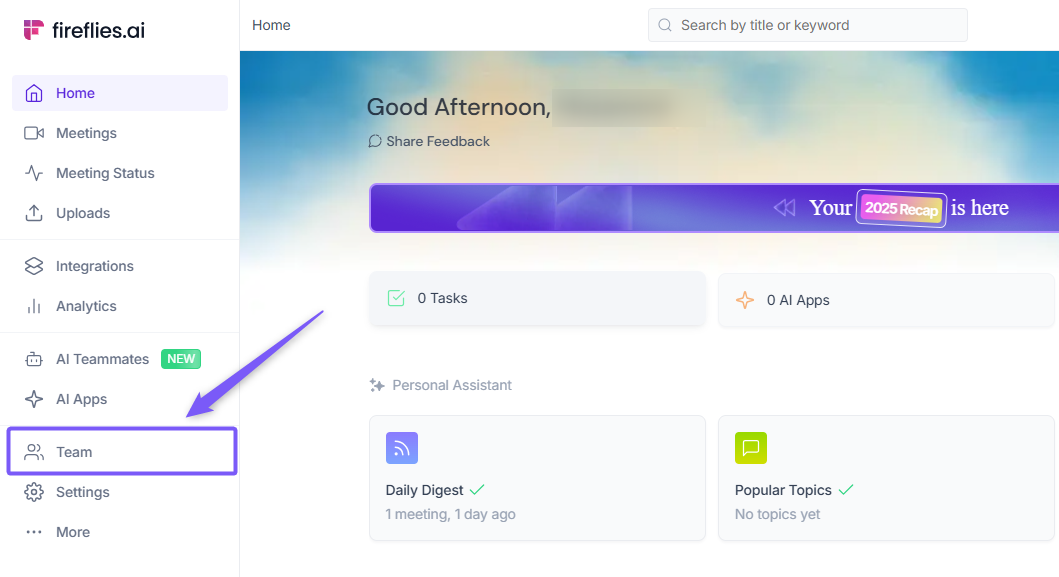
Go to the Team tab in the left-hand menu.
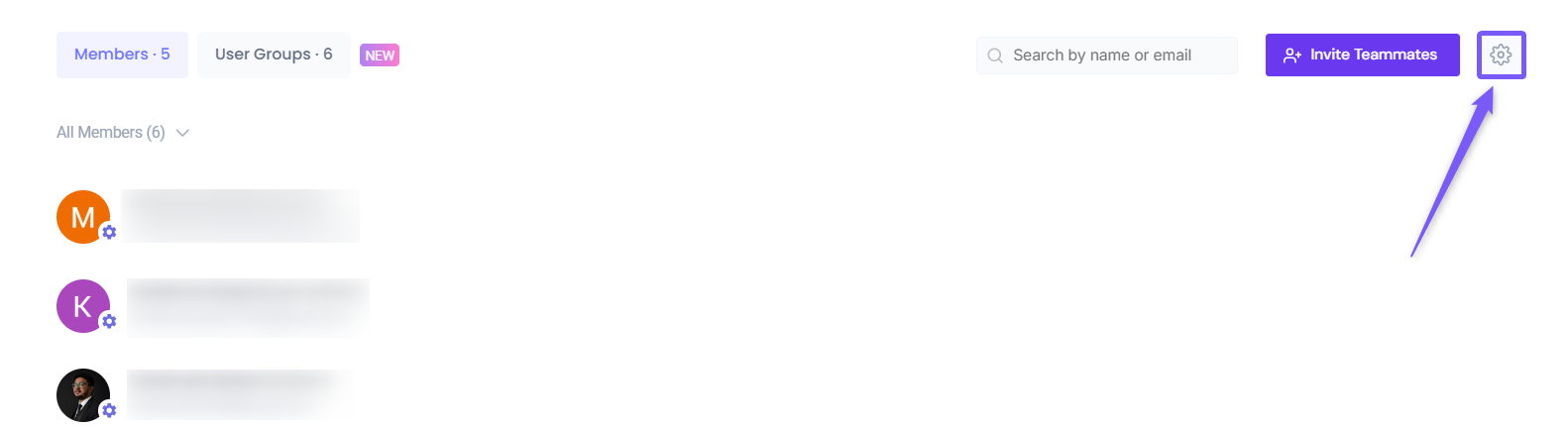
Click on the Settings icon in the top-right corner.
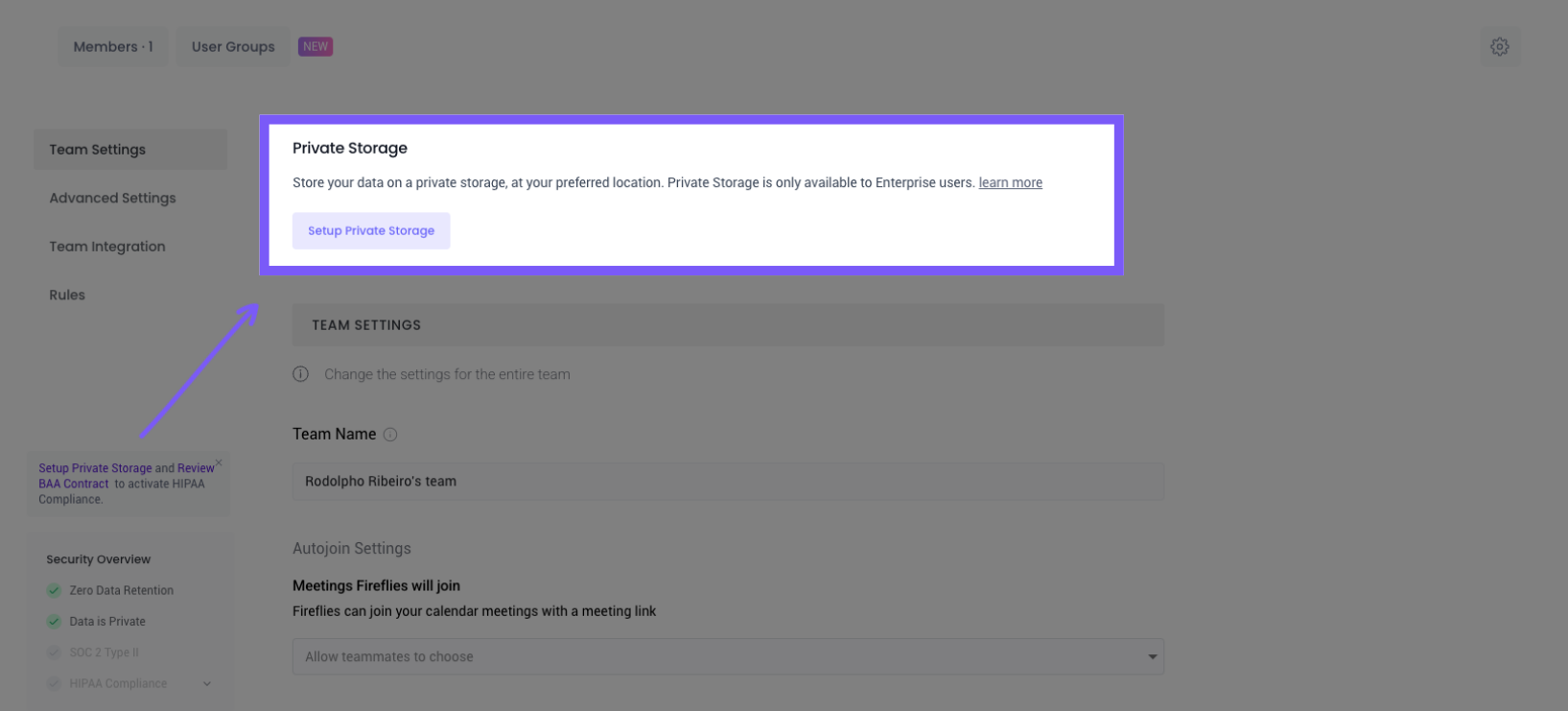
At the top of the page, locate the Private Storage and click Set up Private Storage.
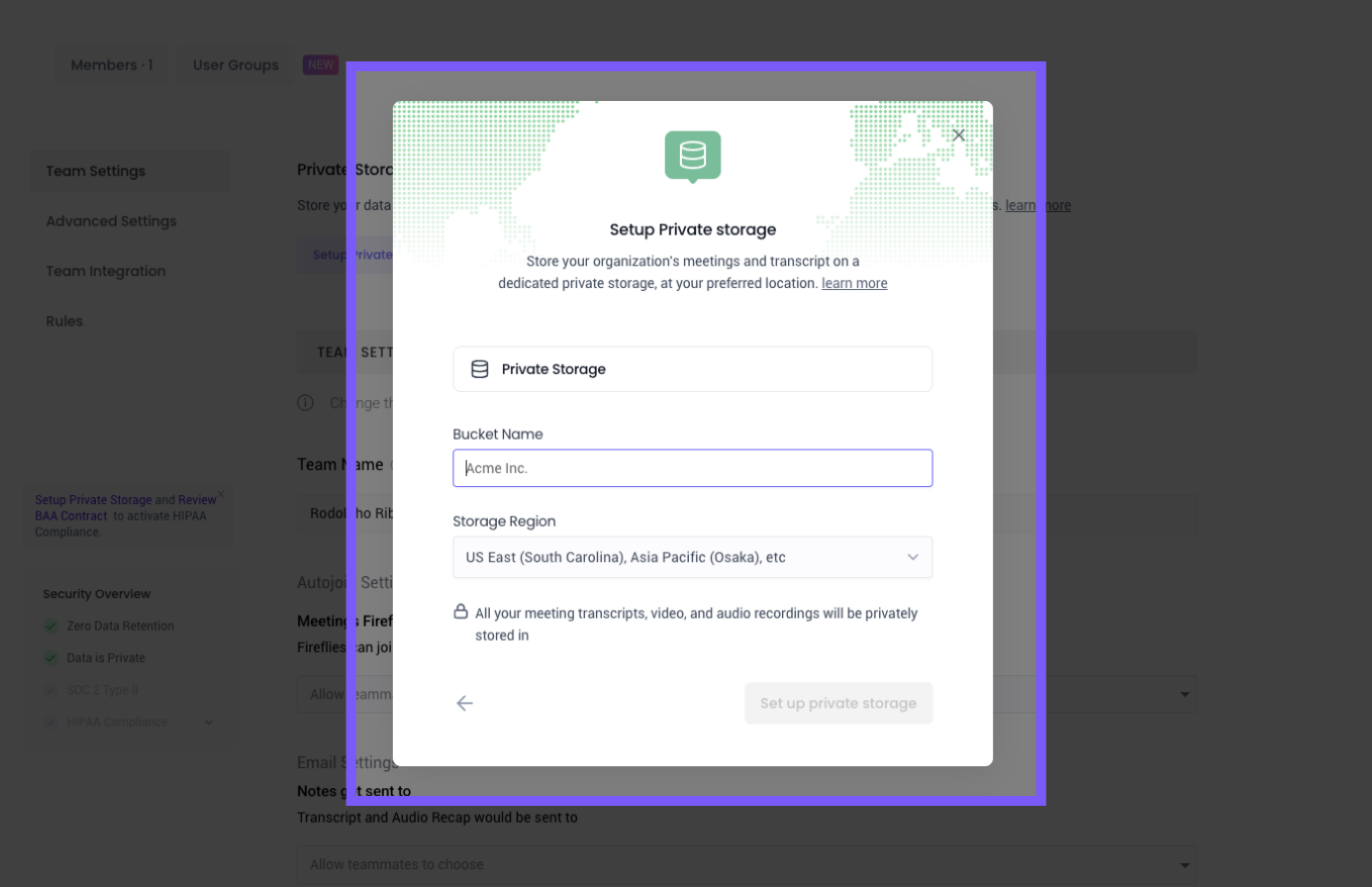
Follow the on-screen steps to complete the setup.
Your data will be moved to a dedicated infrastructure
This ensures complete separation from shared resources
📌 Need more help setting up? Learn how to Set up Private Storage for your workspace.
Step 2: Review and Accept DSA (FERPA)
To complete FERPA compliance, review and accept the Data Sharing Agreement (DSA).
Access the DSA contract page and follow the steps to complete its signature.
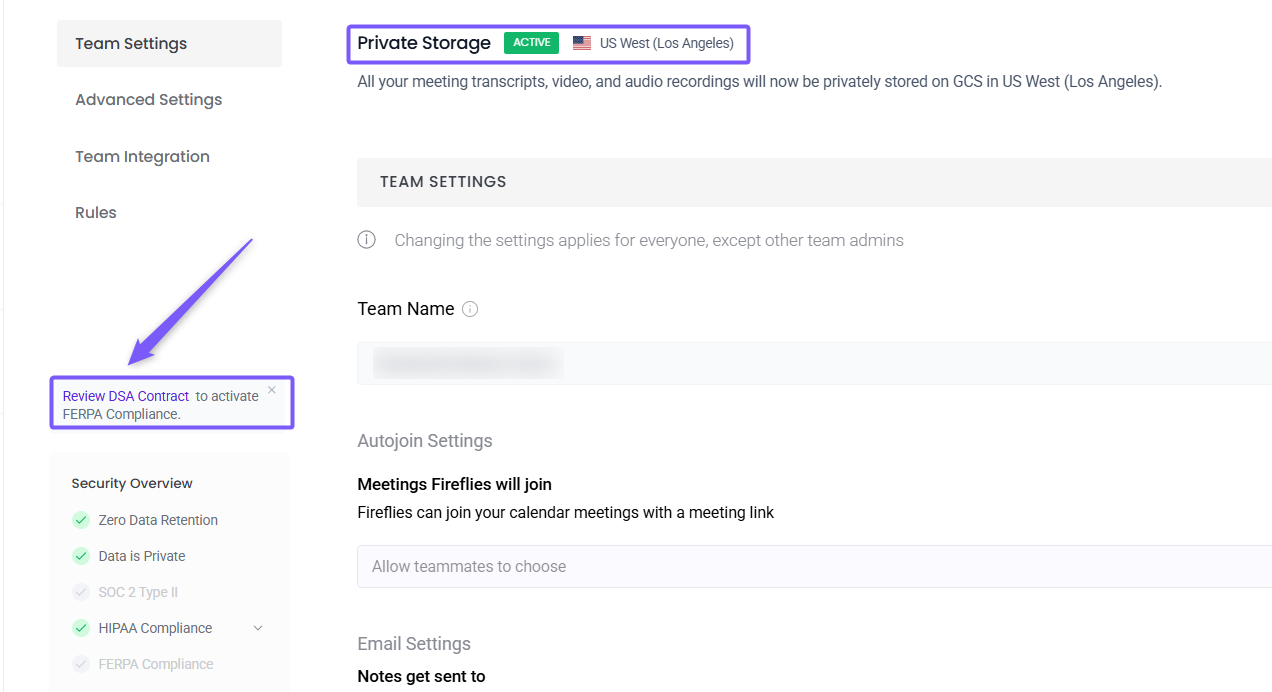
Once accepted, your workspace meets the contractual requirements for FERPA compliance.
Step 3: Verify FERPA activation
Once Private Storage is enabled and the DSA is accepted:
Open your Security Checklist in Team Settings
Confirm FERPA Compliance shows as ✅ Enabled
FERPA controls are now active across your workspace
If either requirement is removed or your plan is downgraded, FERPA compliance will be disabled automatically.
Maintaining FERPA compliance
Your FERPA compliance status depends on maintaining both requirements:
Compliance stays active | Compliance disables |
Enterprise plan + Private Storage enabled + Accepted DSA (FERPA) | If any one of these is removed or downgraded, FERPA compliance will be automatically disabled. |
Understanding data protection
Zero Data Retention and Data is Private are always enabled for your workspace. These protections apply automatically and require no setup.
Data is Private – Fireflies does not use your data to train AI models and does not share customer data with any third parties. Your data remains your own.
Zero Data Retention – AI vendors are required to follow a zero data retention policy and cannot store, re-access, or use your data to train AI systems.
You can hover over each item in the Security Checklist to view these explanations directly in the product. These protections apply to all plans and users.
🎯 Making sense of it all
FERPA compliance is available on Enterprise plans only
Private Storage and an accepted DSA (FERPA) are required
The Security Checklist shows your compliance status in real time
Any plan or setting change immediately updates your FERPA status
Removing a required control will disable FERPA compliance
This setup helps ensure conversations involving student education records are handled responsibly and in line with FERPA requirements.