Learn about Fireflies supported languages
Last updated: April 29, 2026
Whether your meetings happen in one language or many, Fireflies makes sure nothing gets lost in translation. Fireflies supports transcription and summaries in over 100+ languages, so your team can stay aligned no matter where they're calling from or what language they speak. And if your meetings involve multiple languages at once, Fireflies can handle that too.
📋 Supported Languages
Fireflies supports transcription and summaries in 100+ languages, including regional variants. You can also choose:
Auto-Detect – Transcribes the dominant language automatically
Multi-Language (Auto-Detect) – Detects and transcribes multiple languages in the same meeting
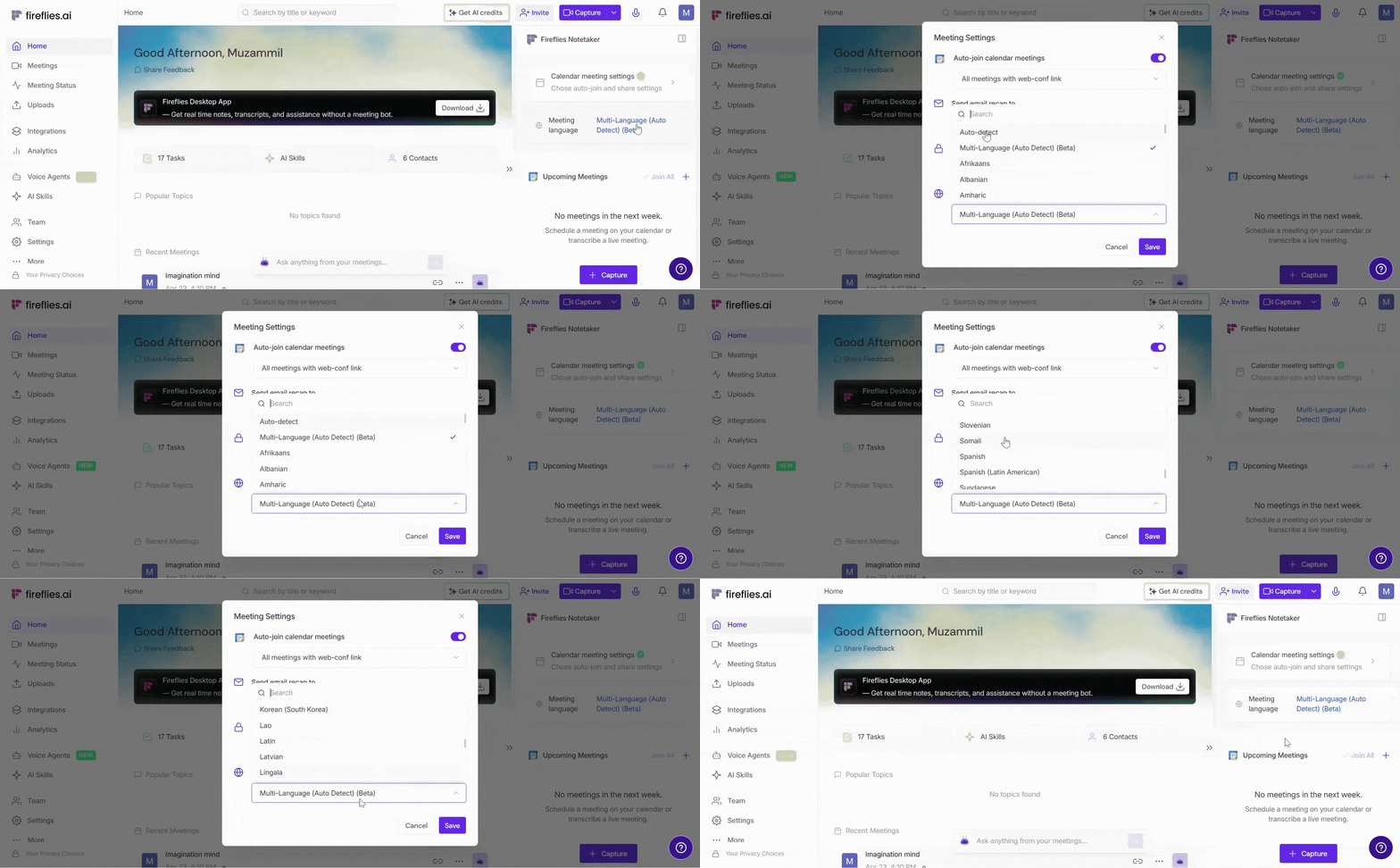
Use the dropdown table below to view all the supported languages and their codes.
View the Full List of Supported Languages ✅
# | Fireflies Supported Languages | Language Code |
1 | Auto-Detect | auto |
2 | Multi-Language (Auto-Detect) (Beta) | multi-language |
3 | Afrikaans | af |
4 | Albanian | sq |
5 | Amharic | am |
6 | Arabic | ar |
7 | Armenian | hy |
8 | Assamese | as |
9 | Azerbaijani | az |
10 | Bashkir | ba |
11 | Basque | eu |
12 | Belarusian | be |
13 | Bengali | bn |
14 | Bosnian | bs |
15 | Breton | br |
16 | Bulgarian | bg |
17 | Burmese | my |
18 | Catalan | ca |
19 | Chinese | zh |
20 | Chinese (China) | zh-CN |
21 | Chinese (Taiwan) | zh-TW |
22 | Croatian | hr |
23 | Czech | cs |
24 | Danish | da |
25 | Danish (Denmark) | da-DK |
26 | Dutch | nl |
27 | English (Australia) | en-AU |
28 | English (Global) | en |
29 | English (India) | en-IN |
30 | English (New Zealand) | en-NZ |
31 | English (UK) | en-GB |
32 | English (US) | en-US |
33 | Estonian | et |
34 | Faroese | fo |
35 | Finnish | fi |
36 | Flemish | nl-BE |
37 | French | fr |
38 | French (Canada) | fr-CA |
39 | Galician | gl |
40 | Georgian | ka |
41 | German | de |
42 | German (Switzerland) | de-CH |
43 | Greek | el |
44 | Gujarati | gu |
45 | Haitian | ht |
46 | Hausa | ha |
47 | Hawaiian | haw |
48 | Hebrew | he |
49 | Hindi | hi |
50 | Hindi (Latin) | hi-Latn |
51 | Hungarian | hu |
52 | Icelandic | is |
53 | Indonesian | id |
54 | Italian | it |
55 | Japanese | ja |
56 | Javanese | jw |
57 | Kannada | kn |
58 | Kazakh | kk |
59 | Khmer | km |
60 | Korean | ko |
61 | Korean (South Korea) | ko-KR |
62 | Lao | lo |
63 | Latin | la |
64 | Latvian | lv |
65 | Lingala | ln |
66 | Lithuanian | lt |
67 | Luxembourgish | lb |
68 | Macedonian | mk |
69 | Malagasy | mg |
70 | Malay | ms |
71 | Malayalam | ml |
72 | Maltese | mt |
73 | Maori | mi |
74 | Marathi | mr |
75 | Mongolian | mn |
76 | Nepali | ne |
77 | Norwegian | no |
78 | Nynorsk | nn |
79 | Occitan | oc |
80 | Pashto | ps |
81 | Persian | fa |
82 | Polish | pl |
83 | Portuguese | pt |
84 | Portuguese (Brazil) | pt-BR |
85 | Portuguese (Portugal) | pt-PT |
86 | Punjabi | pa |
87 | Romanian | ro |
88 | Russian | ru |
89 | Sanskrit | sa |
90 | Serbian | sr |
91 | Shona | sn |
92 | Sindhi | sd |
93 | Sinhala | si |
94 | Slovak | sk |
95 | Slovenian | sl |
96 | Somali | so |
97 | Spanish | es |
98 | Spanish (Latin American) | es-419 |
99 | Sundanese | su |
100 | Swahili | sw |
101 | Swedish | sv |
102 | Tagalog | tl |
103 | Tajik | tg |
104 | Tamil | ta |
105 | Tatar | tt |
106 | Telugu | te |
107 | Thai | th |
108 | Tibetan | bo |
109 | Turkish | tr |
110 | Turkmen | tk |
111 | Ukrainian | uk |
112 | Urdu | ur |
113 | Uzbek | uz |
114 | Vietnamese | vi |
115 | Welsh | cy |
116 | Yiddish | yi |
117 | Yoruba | yo |
🌐 Ways to Manage Meeting Language
Fireflies provides multiple ways to manage transcription language based on your meeting type and workflow.
Set a Default Language: Apply one transcription language to all future meetings. This is useful if your team primarily speaks the same language.
Auto Language Detection: Want Fireflies to pick the right language automatically? It detects and transcribes the primary language spoken in the meeting—no manual selection needed.
Change Language for a Specific Meeting: Update the transcription language for a single upcoming meeting without affecting your default setting. This only applies to meetings you own or are hosting
Multi-Language Mode: Automatically detect and transcribe multiple spoken languages within the same meeting. This is ideal for multilingual conversations or meetings where speakers switch languages.
💡 Curious how Fireflies handles multilingual meetings? Multi-Language Mode supports 60+ languages in a single conversation. Explore Multi-Language Mode →
❓ Frequently Asked Questions
1. Can Fireflies detect multiple languages in one meeting?
Yes. With Multi-Language Mode enabled, Fireflies can detect and transcribe multiple spoken languages in the same meeting.
📌 Learn more about Multi-Language Mode and how to set it →
2. What’s the difference between Auto-Detect and Multi-Language Mode?
Auto-Detect transcribes the dominant language spoken during the meeting.
Multi-Language Mode transcribes multiple spoken languages in the same meeting.
3. Why is my meeting transcribed in the wrong language?
This can happen if the wrong meeting language is selected or if Auto-Detect identifies the incorrect dominant language.
Try selecting your preferred language manually or use Multi-Language Mode for multilingual conversations.
4. Can I transcribe uploaded files in my preferred language?
Yes. Before uploading, choose your preferred transcription language.
📌 Curious how uploads work? Learn more about the Uploads feature in Fireflies →
5. Can I download transcripts in other languages?
Yes. Before downloading, you’ll need to re-transcribe the meeting in the language you want.
📌Learn how to re-transcribe a meeting into a different language →
Once the transcript is available in that language, you can download it from the Meeting Notepad.
📌 Learn more about downloading transcripts, summaries, and recordings →
Need additional help? Contact our support team for assistance.